Where Python is slow: choosing threads, processes or asyncio for customer data
Adding threads to a slow script sometimes makes it no faster at all. Before choosing a tool, you need to know whether the program is waiting or computing.

In brief
- Threads and asyncio suit work that waits on the network or disk. Computation in pure Python needs processes to get around the GIL.
- NumPy releases the GIL in many low-level operations, so threads can run truly in parallel on numerical data, except for dtype=object arrays.
- The free-threaded build available since Python 3.13 adds an overhead of roughly 1% to 8%, and extensions that are not ready will re-enable the GIL.
A customer sends you a file of 200,000 transaction rows. For each row, your script has to call the customer’s API for extra details, normalise a few text fields, then compute totals per branch. A test run takes the whole afternoon. You wrap the loop in a ThreadPoolExecutor and run it again: sometimes it is much faster, sometimes barely different.
That erratic result is not random. It shows that you picked a tool before knowing what the program spends its time on. On a customer site this mistake has a real cost: you promise a number in the demo, then discover you will never hit it.
The right approach runs in the opposite order. First measure whether the program is waiting or computing, and only then choose between threads, processes and asyncio. Each option has a limit, and Python’s official documentation states those limits clearly.
The GIL blocks only one thing: running Python code in parallel
Python’s threading documentation is blunt: because of the GIL, only one thread can execute Python bytecode at a time, so threads bring little performance benefit to CPU-heavy work. That sentence is often misread as “threads in Python are useless”.
In fact the GIL only stops Python code from running at the same time. The same documentation states that threads are especially useful for I/O-bound tasks such as file operations or network calls, where most of the time is spent waiting for external resources. While one thread waits for an HTTP response, another can keep working.
For CPU-bound tasks, the documentation recommends multiprocessing or ProcessPoolExecutor. According to the multiprocessing documentation, this sidesteps the GIL by using child processes instead of threads.
There is one important exception for people who work with data. The NumPy documentation says NumPy releases the GIL in many low-level operations, so threads that spend most of their time in that low-level code will run truly in parallel. Operations on arrays with dtype=np.object_, however, do not release the GIL.
Two clocks tell you what to choose
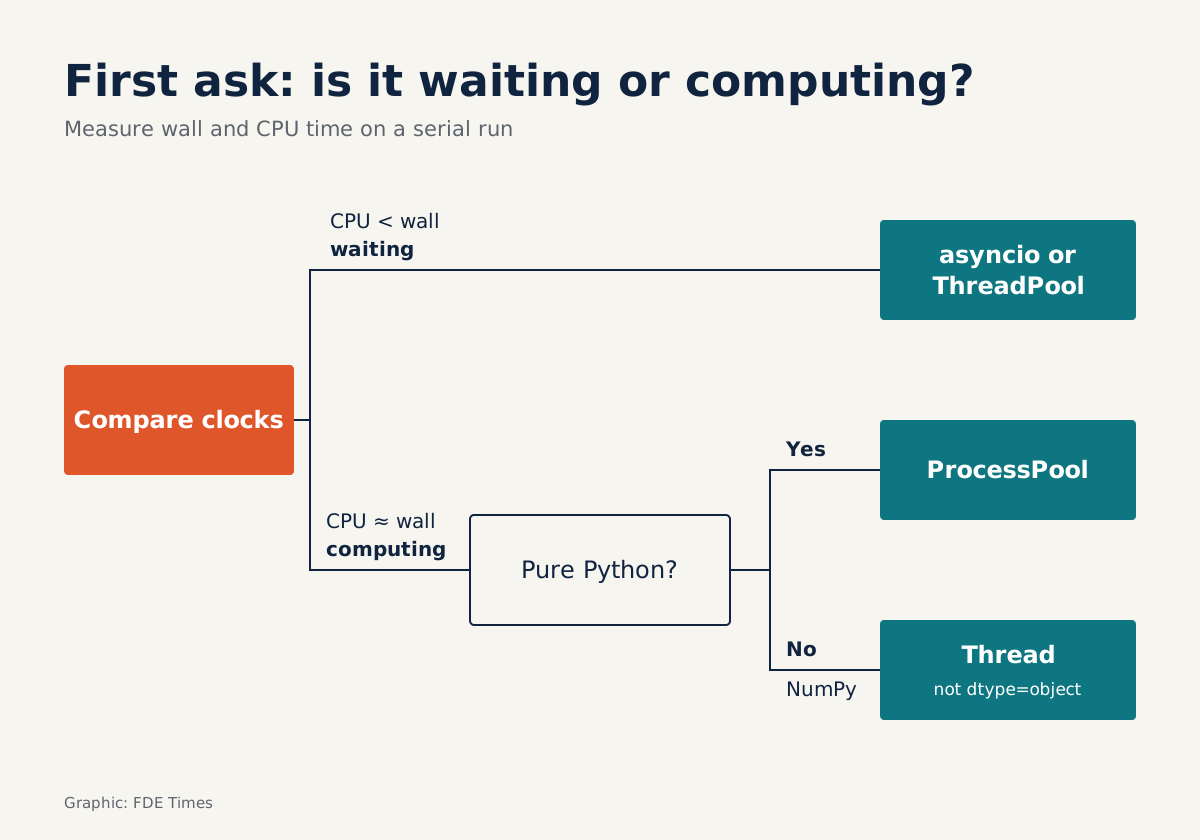
The simplest diagnosis is to compare two clocks. time.perf_counter() measures real elapsed time (wall time), including when the program is sleeping. time.process_time() measures CPU time only, excluding sleep.
From those definitions, the results read as follows. If the two numbers are close, the CPU was working almost the whole time. If CPU time is much smaller than wall time, the difference is time the program was not using the CPU, usually because it was waiting on the network or disk.
import time

def measure(label, fn, *args):
    t0, c0 = time.perf_counter(), time.process_time()
    result = fn(*args)
    wall = time.perf_counter() - t0
    cpu = time.process_time() - c0
    print(f"{label}: wall={wall:.1f}s cpu={cpu:.1f}s")
    return result
This measurement must run on the sequential version, before any threads or processes. The reason: process_time() counts only the CPU of the process being measured, so work pushed out to child processes will not show up in that number, while several threads computing together add their CPU time up. The goal here is to classify each stage before you change anything.
Wrap each stage of the pipeline in this function. Imagine you get results like these. The API-call stage has a very large wall time but CPU time close to zero. The normalisation stage, using regex and for loops, has wall time roughly equal to CPU time, and so does the NumPy aggregation stage. These three stages need three different treatments.
| Stage | Where the time goes | Sensible tool |
|---|---|---|
| Calling APIs, reading databases, downloading files | Waiting on the network or disk | asyncio or ThreadPoolExecutor |
| Loops, regex, dicts in pure Python | Computing in Python code, held by the GIL | ProcessPoolExecutor |
| Operations on large NumPy arrays | Computing in low-level code that has released the GIL | Threads, or let NumPy handle it |
Worked example: one pipeline, three tools
Start with the API-call stage and do the arithmetic. Suppose each call takes 200 ms and you need exactly 200,000 calls, one per row: run sequentially, that is 40,000 seconds, more than 11 hours.
If the customer’s API can handle 20 concurrent connections, in theory you are down to about 2,000 seconds, because nearly all of that time is waiting.
The next step is where it is easy to go wrong. You already have an asyncio event loop, so it is tempting to call the normalisation function directly inside a coroutine. The asyncio documentation warns that if a compute-heavy function runs for 1 second, every other Task and concurrent I/O operation is delayed by 1 second.
The right way is to push the computation into a process pool via loop.run_in_executor, so the loop only handles the waiting. The code below is a sketch to illustrate the structure: load_ids is where you connect to the customer’s real file, and before running it in the customer’s environment you still need to add retries, logging and error handling.
import asyncio
from concurrent.futures import ProcessPoolExecutor
import httpx

API_URL = "https://api.example-customer.com"  # replace with the customer's real address
CHUNK = 5000

def clean_row(row):            # example: normalise the branch name
    row["branch"] = row["branch"].strip().upper()
    return row

def normalise(batch):          # module-level function, picklable
    return [clean_row(r) for r in batch]

async def fetch(client, sem, rid):
    async with sem:            # cap the load on the customer's API
        r = await client.get(f"/records/{rid}")
        r.raise_for_status()
        return r.json()

async def main(ids):
    sem = asyncio.Semaphore(20)
    loop = asyncio.get_running_loop()
    pending = []
    with ProcessPoolExecutor() as pool:
        async with httpx.AsyncClient(base_url=API_URL, timeout=30) as client:
            for i in range(0, len(ids), CHUNK):   # only 5,000 coroutines at a time
                chunk = ids[i:i + CHUNK]
                rows = await asyncio.gather(*(fetch(client, sem, rid) for rid in chunk))
                # normalise this batch in the process pool while the next batch calls the API
                pending.append(loop.run_in_executor(pool, normalise, rows))
        parts = await asyncio.gather(*pending)
    return [row for part in parts for row in part]

if __name__ == "__main__":
    ids = load_ids("transactions.csv")   # write this yourself: read 200,000 ids from the customer's file
    rows = asyncio.run(main(ids))
Three details deserve attention. normalise and clean_row live at module level rather than being lambdas, because ProcessPoolExecutor only works with picklable objects, both the function sent out and the result returned.
The data is split into 40 batches of 5,000 rows each instead of being sent row by row: Itamar Turner-Trauring of pythonspeed.com points out that moving data between processes can be very slow, sometimes slower than the computation itself.
The third detail is the batched loop: the program does not create 200,000 coroutines at once but works through chunks of 5,000 ids. That keeps memory under control, and if the customer’s API starts returning errors halfway through, you know which batch you are on.
The final stage, once the data has become numerical arrays, is where threads pay off. Say you need to convert amounts at an exchange rate and then sum by branch. Array multiplication runs in NumPy’s low-level code, so you can split the array into a few chunks and give each chunk a thread:
import numpy as np
from concurrent.futures import ThreadPoolExecutor

def convert(amounts, rates):
    return amounts * rates     # array operation, no Python for loop

def convert_parallel(amounts, rates, n=4):
    a_parts = np.array_split(amounts, n)
    r_parts = np.array_split(rates, n)
    with ThreadPoolExecutor(max_workers=n) as pool:
        parts = list(pool.map(convert, a_parts, r_parts))
    return np.concatenate(parts)

# amounts, rates, branch_ids: NumPy arrays you build from rows in the previous step
converted = convert_parallel(amounts, rates)
totals = np.bincount(branch_ids, weights=converted)
With 200,000 rows, this part may already be fast enough without threads. The technique is worth using when arrays are much larger. A simple check: measure the wall time of convert run once over the whole array, then measure convert_parallel. If the number does not fall, threads add nothing and you should drop them.
Conversely, if your “NumPy operation” is really a for loop over each element, threads will not help. That loop is still Python code and still has to hold the GIL.
Five steps to try on your next project
- Measure wall time and CPU time for each stage on the sequential version, and record the results before changing anything.
- For waiting stages, use asyncio if the client library supports async, otherwise
ThreadPoolExecutor. Always cap the number of connections, because the customer’s system was not designed to withstand your load test. - For stages that compute in pure Python, use
ProcessPoolExecutorand send data in batches. - For NumPy stages, check whether the code really is array operations and whether the arrays are
dtype=object, and only then try threads. - Measure wall time again with exactly the function used in step one, and report the before and after numbers to the customer.
Those before and after numbers are also what belongs on your CV. A line such as “Cut processing time for a customer’s file from X to Y by moving API waits to asyncio and normalisation to a process pool” shows a recruiter that you can diagnose, not just add threads.
If an interview turns to the GIL, a real example like that is always more convincing than a memorised definition.
Mistakes that keep recurring
The most common mistake is passing a lambda, or a function hastily written in a notebook, to a process pool. Because ProcessPoolExecutor only works with picklable objects, the safe approach is to move the function into a .py file at module level and import it.
The second is letting computation slip into the event loop unnoticed. Every second of computation there is a second every other Task has to stand and wait. When an asyncio service is unusually slow, measure CPU time around the coroutines before blaming the network.
The third is mixing processes with libraries that are already multithreaded. The Polars documentation notes that Polars runs multithreaded on its own, and forking a multithreaded process can cause deadlocks, so it recommends spawn as the safest method on every platform.
The price of spawn is that processes start fairly slowly. That is one more reason to create the pool once and reuse it across many batches, rather than starting a new process for each small task.
What about Python without the GIL?
Since Python 3.13, CPython has a free-threaded build with the GIL disabled. PEP 779 sets the criteria for phase II, in which the build is officially supported but still optional; making it the default is left to a later PEP. It sounds attractive, but it should not yet be the first choice for a customer’s system.
The Python documentation says the free-threaded build carries extra overhead. On the pyperformance benchmark suite, the average overhead ranges from about 1% on macOS aarch64 to 8% on Linux x86-64.
More dangerously, some third-party packages with extension modules that are not yet ready will turn the GIL back on.
If you want to try it, list every library with extensions in the customer’s environment and check each one first. Then measure again with the same pair of clocks described above. The tools may change, but the first question stays the same: is your program waiting or computing?
Was this article useful?
Thanks for the feedback!
10 sources
- threading — Thread-based parallelism — Python documentation
- multiprocessing — Process-based parallelism — Python documentation
- Developing with asyncio — Python documentation
- concurrent.futures — Launching parallel tasks — Python documentation
- Python support for free threading — Python documentation
- PEP 779 – Criteria for supported status for free-threaded Python
- Thread Safety — NumPy Manual
- time — Time access and conversions — Python documentation
- Python's multiprocessing performance problem (Itamar Turner-Trauring, pythonspeed.com)
- Multiprocessing — Polars user guide