Hands-on: parallel tool calls where one failure does not sink the whole turn
When an agent calls several tools at once, every call needs a result back, failed calls included. To find out how often your handling loop still breaks, you have to count.

In brief
- Claude can return several tool_use blocks in one turn. Whether they run in parallel or in sequence is your call, and it depends on whether a tool has side effects.
- Every call needs a tool_result with a matching tool_use_id, including calls that fail or are skipped (is_error: true, with a short reason).
- Measure the tool error rate on a realistic test set, along with run time and call count, to find out whether a fix actually makes the agent better.
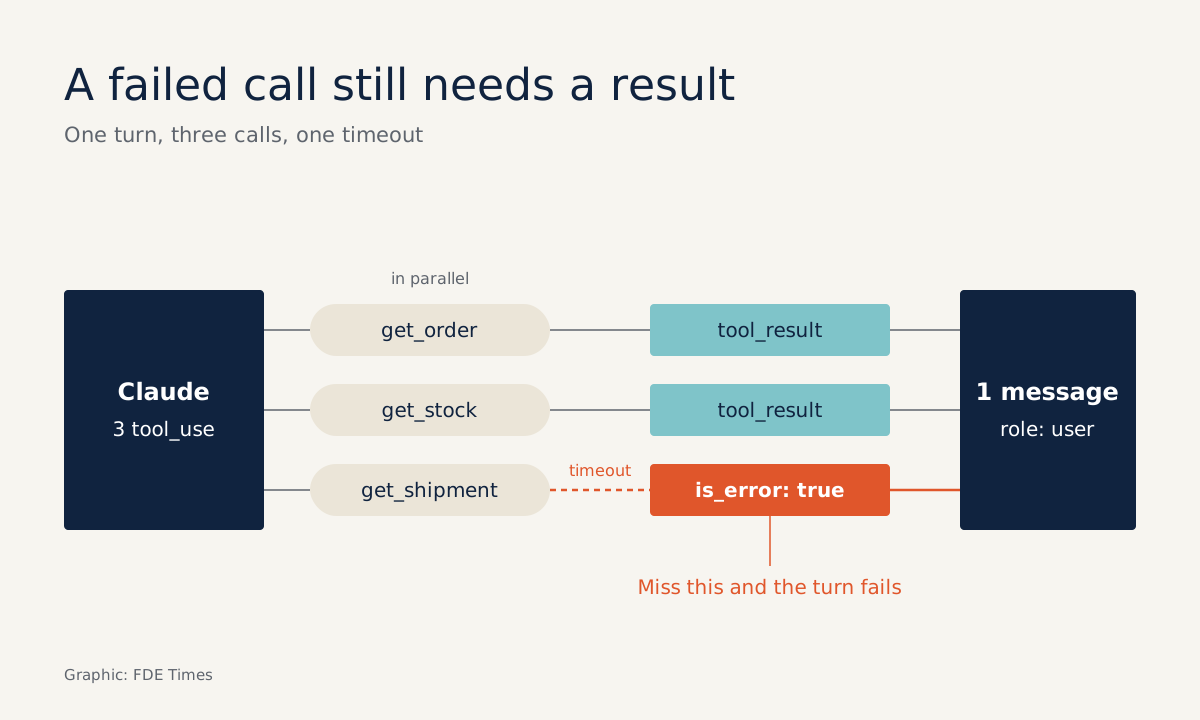
A customer service agent gets the question “where is my order, and do you have stock for an exchange?” and returns three tool calls in one turn. Two of them succeed. The third, to the shipping system, times out. If your code sends back only two results, the whole turn breaks, even though two-thirds of the work is done.
This is not a rare case. Anthropic’s documentation confirms that Claude can return several tool_use blocks in one turn, and the API does not fix the order they run in. You can run them concurrently with asyncio.gather or Promise.all, or one at a time in the order they appear.
OpenAI also advises assuming there will be several calls, because a response can contain zero, one or many.
For FDEs this is routine work. The tools at a customer site are slow, flaky internal APIs: some only read data, some move real money. This guide shows how to build a handling loop that survives partial failure, and then how to measure how often it still breaks.
What will you build, and what do you need?
You will build three things. First, a function that runs the tool calls: read-only tools in parallel, side-effect tools in sequence. Second, a function that collects the results into one valid message. Third, a script that runs a test set and prints the error rate.
You need Python with asyncio, an agent that already calls Claude with a few tools, and familiarity with the structure of a tool_use block. The code below is a cut-down version for illustration, without the API call, authentication or retries. The running example is an order agent with four tools: get_order, get_shipment, get_stock (read-only) and issue_refund (side effect).
Step 1: classify tools before writing any async code
Anthropic’s guidance is clear: independent, read-only operations are usually safe to run in parallel and cut latency. Tools that have side effects, share state or need a strict order should probably run in sequence. So the first job is to put this classification in code, not leave it in your head.
import asyncio, time

READ_ONLY = {"get_order", "get_shipment", "get_stock"}
SIDE_EFFECT = {"issue_refund"}  # run sequentially, in the order the model gave
Check: every tool in the agent must be in exactly one of the two sets. Put any tool you are unsure about in SIDE_EFFECT. Running a little slower is still cheaper than refunding twice.
Step 2: wrap each call so errors do not spread
Wrap each call on its own. When it fails, you still return a tool_result, with is_error: true and a short explanation. Anthropic’s documentation asks for exactly this, both for calls that error and for calls you decide to skip.
async def run_one(block, log):
    start = time.monotonic()
    try:
        out = await TOOLS[block.name](**block.input)
        res = {"type": "tool_result", "tool_use_id": block.id, "content": out}
    except TimeoutError:
        res = {"type": "tool_result", "tool_use_id": block.id, "is_error": True,
               "content": "Shipping system did not respond within 5s. "
                          "Retry get_shipment once, or answer without a delivery date."}
    except Exception as e:
        res = {"type": "tool_result", "tool_use_id": block.id, "is_error": True,
               "content": f"{block.name} failed: {type(e).__name__}. Check the input fields."}
    log.append({"tool": block.name, "is_error": res.get("is_error", False),
                "seconds": time.monotonic() - start})
    return res
Look at the error content. Anthropic recommends writing error messages that tell the agent exactly what to fix, rather than passing on cryptic codes or tracebacks. “Retry once, or answer without a delivery date” gives the model a way out. A bare HTTP 504 string just leaves it guessing.
Check: simulate a TimeoutError in get_shipment, then confirm the function still returns a dict with the correct tool_use_id.
Step 3: run the read-only calls in parallel and the rest in sequence
async def run_turn(tool_blocks, log):
    reads = [b for b in tool_blocks if b.name in READ_ONLY]
    writes = [b for b in tool_blocks if b.name not in READ_ONLY]
    # Simplified: every write call waits until all read calls have finished.
    results = dict(zip([b.id for b in reads],
                       await asyncio.gather(*(run_one(b, log) for b in reads))))
    failed = None
    for b in writes:
        if failed:
            results[b.id] = {"type": "tool_result", "tool_use_id": b.id, "is_error": True,
                             "content": f"Not executed: the preceding {failed} call failed."}
            continue
        r = await run_one(b, log)
        results[b.id] = r
        if r.get("is_error"):
            failed = b.name
    return [results[b.id] for b in tool_blocks]  # keep the original order
The loop for write calls follows the example in Anthropic’s documentation. When a write call fails, the dependent calls after it are not run, but each still gets an error result, along the lines of “Not executed: the preceding write_file call failed.” This cut-down version treats every later write call as dependent on the one before.
In a real system, declare dependencies more precisely, and make a write call wait only for the read calls it actually needs.
Check: make the first issue_refund fail, then confirm the second call never touches the payment system.
Step 4: send every result back in one message
All the results of a parallel turn must go back together in the next user message. Each result matches its call through tool_use_id, and every tool_result block must come before any text.
results = await run_turn(tool_blocks, log)
next_user_message = {"role": "user", "content": results} # text, if any, goes lastIf you do not need this level of control, Anthropic recommends the SDK’s Tool Runner. It handles responses with several calls and formats the results for you.
Write your own loop like the one above only when you need custom batching, ordering or error handling. If you use OpenAI and want to avoid parallel calls altogether, the parallel_tool_calls=false parameter limits each turn to zero or one call.
Step 5: count errors on a test set instead of trusting your instincts
You only know whether the handling loop works by measuring it. Anthropic recommends building plenty of evaluation tasks based on real usage. Beyond accuracy, collect the run time of each call and each task, the number of tool calls, token counts and the number of tool errors.
A test case like “look up order 123” is too easy. Take questions from real tickets: a customer who asks three things at once, mistypes the order number, or demands a refund for an order that has not shipped.
def summarize(task_logs):
    calls = [c for log in task_logs for c in log]
    if not calls:  # avoid division by zero and max() on an empty list
        return {"tool_error_rate": None, "calls_per_task": 0, "max_call_s": None}
    errors = sum(c["is_error"] for c in calls)
    return {"tool_error_rate": errors / len(calls),
            "calls_per_task": len(calls) / len(task_logs),
            "max_call_s": max(c["seconds"] for c in calls)}
max_call_s is only the slowest call, not a percentile. Once the test set is large enough, also calculate p95 so that a single stray timeout does not distort the picture.
Take a hypothetical example: 20 test cases produce 64 tool calls, 8 of which have is_error. The tool error rate is 8/64 = 12.5%. Looking at the log, suppose 5 of the errors come from get_shipment timeouts.
You change the error message so the model retries only once, rerun the same 20 cases, and compare both the error rate and the calls per task. If errors fall but the call count jumps, the agent may be retrying indiscriminately.
Where do hand-written loops most often go wrong?
The first thing to check is any call that fails or is skipped without producing a result, for instance code that catches an exception, logs it and moves on. Anthropic’s rule is plain: that call still needs a tool_result with is_error: true. The second is putting text before the tool_result blocks.
Another mistake can have real consequences: running side-effect tools in parallel just because gather is convenient. And do not drop a raw traceback into content and then wonder why the agent keeps repeating the same mistake.
How does this skill show up at a customer site?
The tools at a customer site are the customer’s own systems, so you will probably be asked what the agent does when one of them misbehaves. Prepare that answer in advance rather than waiting for the question.
With a table classifying tools as read-only or side-effecting, you have something to bring to a working session with the customer’s operations team. With a tool error rate measured on test cases taken from their own tickets, you have a number to report instead of a demo.
When writing a CV or interviewing for an FDE role, tell exactly that story: which tools run in parallel, how errors are returned to the model, the error rate before and after the fix. When reading job descriptions, look for requirements around agent reliability or evals, because that is where this story is useful.
Getting an agent to work in a demo is easy. An agent that notices a tool has just failed, retries only once and still answers the customer is what customers are willing to put into production.
Was this article useful?
Thanks for the feedback!