'Latest wins' quietly overwrites your client's CRM data
The usual culprit is a write based on a stale read, so give every field one owning system and let a human settle unclear cases.
In brief
- Last-write-wins sounds fair but silently overwrites important fields without leaving a trace.
- Detect conflicts per field, and resolve only the fields that both sides edited.
- For fields with no clear owner, create a conflict record for a reviewer, and rehearse recovery before turning on two-way writes at scale.
HubSpot’s official Salesforce integration describes its Two-way rule in a single sentence: the most recent value always overwrites any existing value. It sounds perfectly fair.
Yet Apollo’s 2026 playbook on record conflict resolution calls this very “last write wins” default the most dangerous one, because it silently overwrites high-value fields without leaving an audit trail.
For FDEs this is a practical problem. Whenever a product you deploy has to sync with a client’s CRM, the sales team edits in Salesforce, users edit in your app, and the sync job in the middle has to decide who is right.
If you do not decide in advance, the system decides for you. ATAK Interactive, a firm that specializes in Salesforce–HubSpot integrations, warns that when two systems update the same contact within a short window and no clear rules exist, the outcome is unpredictable. And the client will blame your product.
The real bug usually comes from an old copy of the record
Unify GTM, writing about conflicts in two-way CRM sync, defines a stale write as a process proposing changes based on an outdated state of the record. This mechanism sits behind a great many overwrites. Take a hypothetical case, followed minute by minute, to see how it plays out.
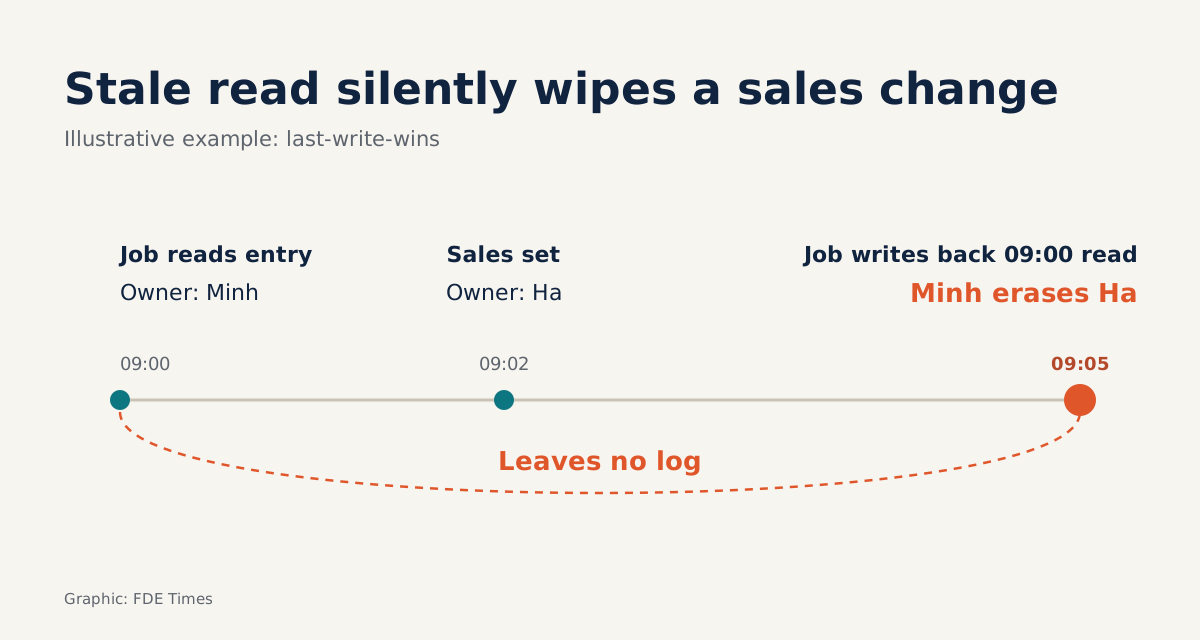
Your customer support app syncs Contacts with the client’s Salesforce. At 09:00 the sync job reads the contact “Lan”: job title “Engineer”, owner “Minh”. At 09:02 a sales rep changes the owner to “Ha” directly in Salesforce. At 09:03 a user in your app updates Lan’s title to “Team Lead”.
At 09:05 the job pushes the whole record to Salesforce, built from the 09:00 read: title “Team Lead”, owner “Minh”. Under last-write-wins, 09:05 is the latest timestamp, so it wins. Ha loses the account without anyone noticing, and no log line explains why.
Look closely and the two sides never edited the same field. The app changed only the title; the CRM changed only the owner.
Stacksync describes exactly this point in its conflict resolution engine: conflicts are detected at the field level, so two people editing two different fields on the same record do not collide, and resolution rules apply only to a field edited in both systems.
One owner per field, in writing
The root fix is to settle which system owns each field. Apollo advises replacing blanket policies such as “the CRM always wins” with a per-field matrix that assigns each field to exactly one owning system.
ATAK gives the same advice: decide which system owns each field and record it in a matrix the whole team can consult.
HubSpot’s integration offers three rule types for implementing that matrix. The first, “Always use Salesforce”, makes Salesforce the fixed source of truth: HubSpot never writes back, even when Salesforce is blank.
The second, “Prefer Salesforce unless blank”, is softer. HubSpot may fill an empty field but never overwrites an existing value.
The third is Two-way, the last-write-wins behavior seen above.
Applied to the example, the matrix might look like this:
| Field | Owning system | Rule | Why |
|---|---|---|---|
| Owner | CRM | Always use the CRM | Account ownership must not be decided by timing |
| Lifecycle stage | CRM | Always use the CRM | Lifecycle data feeds sales reporting |
| Phone number | CRM | Prefer the CRM unless blank | The app may fill gaps but not overwrite |
| Product usage | App | Always use the app | Only the app can measure it; the CRM just reads |
| Job title | Undecided | Create a conflict record | Waiting for the client’s RevOps to settle ownership |
The last row matters most. Unify GTM is explicit: if you do not know who has authority, the safe outcome is a conflict record, not a last-write-wins overwrite. It also advises against last-write-wins for ownership, lifecycle and compliance data, and for anything entered by hand.
Write the sync logic per field
The matrix is only worth something if the code respects it. The key trick is to keep the values from the last sync (call them base) so you know which side actually made a change, instead of comparing timestamps for the whole record.
RULES = {
    "owner_id": "always_crm",
    "lifecycle_stage": "always_crm",
    "phone": "crm_unless_blank",
    "usage_score": "always_app",
    # job_title has no owner yet -> falls through to the conflict branch
}

def resolve(field, base, crm, app):
    crm_changed = crm != base
    app_changed = app != base
    if not app_changed:
        return ("keep", crm)          # app made no edit: push nothing to the CRM
    rule = RULES.get(field)
    if rule == "always_crm":
        return ("keep", crm)
    if rule == "crm_unless_blank":
        return ("write", app) if not crm else ("keep", crm)
    if rule == "always_app":
        return ("write", app)
    if not crm_changed:
        return ("write", app)         # only the app edited: no conflict
    return ("conflict", {"base": base, "crm": crm, "app": app})
Replay the 09:05 scenario. For owner_id, the app side is unchanged from base (“Minh”), so the function returns keep and the value “Ha” stays. For job_title, only the app changed, so the new title is written. The stale write disappears because the job no longer pushes what it did not change.
Now suppose sales also changed the title to “Manager” at 09:04. Both sides have then edited the same unowned field, so the function returns conflict. The record goes into a queue carrying all three values, base, CRM and app, for a reviewer to pick the right one.
Rolling it out step by step on the client site
Start by sitting down with the client’s CRM admin or RevOps team and listing every field the integration will write. Then fill in the matrix, one owner per field, and have them confirm it in writing. The matrix becomes a handover document the client’s whole team will use after you leave.
Next, map the matrix onto the tool in use. Stacksync organizes it in layers: a global default, overrides per object, then system-of-record rules per field, for example the CRM as authority for customer names and the ERP as authority for billing data. If you build your own, keep that same order of precedence.
Finally, do not switch on two-way writes for all data at once. Unify GTM recommends rehearsing recovery on reversible records before allowing two-way writes at scale. You need to know how long it takes to restore an overwritten field before the client has to ask.
Common mistakes
The most common mistake is leaving the Two-way default on every field because it looks “balanced”. The second is pushing the whole record instead of only the changed fields, and that habit is what opens the door to stale writes.
A subtler mistake is choosing “Always use Salesforce” for a field the CRM often leaves blank, such as phone number. As HubSpot describes it, data from the other side will then never come across, even when Salesforce is blank, so good data sits dead on one side. “Prefer the CRM unless blank” is the right choice for this kind of field.
To turn this skill into portfolio evidence, build a small sync between two test databases that implements all three rules plus a conflict queue. Write a README that sets out the field ownership matrix and the results of a recovery rehearsal.
In interviews, walk through the 09:05 scenario and how the resolve function blocks it. The story shows an interviewer that you treat client data as the client’s asset and know how to protect it before anything goes wrong.
Two-way sync rarely breaks because of the API. It breaks because nobody has answered the question of who owns this field, and the FDE should be the one who asks it in the very first meeting.
Was this article useful?
Thanks for the feedback!
5 sources
- Map HubSpot properties to Salesforce fields · 2026-09-16
- How to Handle Record Conflicts When a Lead Is Updated in Both Systems (2026 Playbook) · 2026-06-01
- Two-Way CRM Sync Conflicts: Field Ownership, Stale Updates, and Recovery · 2026-09-09
- Deep Dive: Stacksync's Conflict Resolution Engine for Bidirectional CRM Integration · 2026-03-22
- Resolving Data Conflicts in Salesforce-HubSpot Integrations: Best Practices · 2025-05-05