Hands-on: clustering 5,000 support tickets with embeddings to pick the first AI use case
A CSV of support tickets is enough to start the first meeting with a map of what a client's customers actually ask about, so the discussion is not driven by whoever sits in the director's chair.

In brief
- k-means makes you choose the number of clusters up front. HDBSCAN does not, and it puts tickets that belong to no topic in a separate group labelled -1.
- min_cluster_size is the most important parameter. Set it low and you get hundreds of tiny topics; set it high and rare problems can get merged away.
- The largest cluster is not always the first use case. Pick a cluster that is large, repetitive and easy to verify.
Picture a client with 5,000 support tickets. Nobody in the room has read them all, yet everyone is sure they know what customers complain about. The head of operations is certain it is delivery. The customer support lead thinks it is payment errors.
For an FDE, the question “which AI use case should we build first?” usually arrives at exactly that moment: the data is there, and every person in the room has a different opinion.
This guide walks through a pipeline small enough to run on a laptop. At an assumed scale of 5,000 tickets, an afternoon is a reasonable estimate for this scenario, not a measured figure. The pipeline turns a pile of raw tickets into a map of topics, each with a name and a count, and from that map you pick the first use case.
Large teams use the same idea. Intercom’s Fin.ai clusters support conversations to discover topics. Anthropic’s Clio groups conversations by topic and then has an LLM write a title and summary for each cluster. Your version is far smaller, but the logic is identical.
What you will build, and what you need
The output is a table: one row per topic, with a readable name, a ticket count and a few representative examples. The pipeline has five steps: create embeddings, reduce dimensions with UMAP, cluster with HDBSCAN, read the noise group, then name the clusters.
You need Python, pandas, the umap and hdbscan libraries, and access to an embedding model and an LLM that the client allows you to use with their data. That last condition matters most. Tickets often contain email addresses, phone numbers and order IDs, so ask about the data rules before sending a single row outside.
The code below is a simplified sketch of the flow, not production code. embed() is a wrapper you write yourself around the approved embedding model.
Steps 1–2: turn text into vectors, then shrink the space
Start by loading the tickets and creating an embedding for each row.
# Simplified: embed() wraps the embedding model the client has approved
import pandas as pd

df = pd.read_csv("tickets.csv")   # columns: id, text
X = embed(df["text"].tolist())    # each ticket -> one vector
Check straight away that the number of vectors equals the number of rows, 5,000 in this scenario. If some are missing, the usual causes are empty tickets or tickets longer than the model’s length limit. Filter or truncate those rows before moving on.
The next step follows Fin.ai’s approach: before clustering, they use UMAP to project the embeddings into a lower-dimensional space, and they note that UMAP works especially well on short texts such as support messages.
The BERTopic documentation explains why: UMAP preserves some of both the local and the global structure of the data, so tickets with similar meanings stay close together after the space is shrunk.
import umap
# A starting point, not a standard value: 5 dimensions, cosine distance
X_low = umap.UMAP(n_components=5, metric="cosine").fit_transform(X)
Do not run UMAP with its default of 2 dimensions. That suits plotting, but for clustering, squeezing the data into too few dimensions can lose information. Cosine is the usual choice for comparing how close text embeddings are in meaning. Both values should be re-tested on the client’s data.
Step 3: why not k-means?
OpenAI’s clustering cookbook runs a simple k-means on 1,000 rows of precomputed embeddings and leaves readers to choose the number of clusters that suits their use case.
That makes k a subjective decision, not a number you can calculate. With a new client’s tickets, you do not know whether there are 8 topics or 80.
If you guess k, you are imposing your own assumptions on the data.
Fin.ai chose HDBSCAN precisely because it does not need the number of clusters in advance. The BERTopic documentation adds two more strengths: HDBSCAN can find clusters of different shapes, and it separates outliers instead of forcing every document into some topic.
import hdbscan
df["cluster"] = hdbscan.HDBSCAN(min_cluster_size=15).fit_predict(X_low)
print(df["cluster"].value_counts().head(20))
The most important parameter is min_cluster_size, the minimum number of tickets needed to form a cluster. Fin.ai treats it as the key parameter to tune. They settled on 15, and on Intercom’s own data that produced more than 700 small topics.
Now picture your 5,000 tickets: if a value of 15 gives you hundreds of fragmented clusters, nobody in the meeting will be able to read them. Re-run with a few larger values, say 30 and 60, and compare the lists. Stop when the clusters at the top of the table match the problems support staff talk about every day.
Step 4: do not delete the -1 label
HDBSCAN gives the label -1, meaning noise, to every ticket that does not belong to a stable cluster. The natural reflex is to filter this group out to keep the table clean. Do not.
noise = df[df["cluster"] == -1]
print(len(noise), "noise tickets")
print(noise.sample(min(30, len(noise)))["text"].tolist())
The noise group may contain long-tail problems: a bug that appeared last week, an enterprise customer with its own incident, or a feature request nobody has grouped yet.
Reading 30 rows by hand takes little time. In return, you see details the count table misses. One more check worth running: compare the size of the -1 group across two runs with different min_cluster_size values, and read which tickets move from a cluster into noise or the other way round.
Step 5: name the clusters in two layers
A cluster that only has a number means nothing to the client. The cheapest approach follows BERTopic: extract the most important words in each cluster with c-TF-IDF to get a rough description of the topic straight away.
The second layer is an LLM. OpenAI’s cookbook sends a random sample of 5 reviews per cluster to gpt-4 to name it. The page has been marked as archived, so the model name may be out of date, but the method still holds. Fin.ai also has a separate LLM step that turns the final topics into readable labels.
# Simplified: llm() wraps the approved LLM and returns a string
names = {}
for c, g in df[df["cluster"] >= 0].groupby("cluster"):
    sample = g["text"].sample(min(5, len(g))).tolist()
    names[c] = llm("Give this group of tickets a short name:\n" + "\n".join(sample))

df["topic"] = df["cluster"].map(names).fillna("Noise (-1)")
print(df["topic"].value_counts().head(20))
Check after this step: every cluster other than -1 must have a name in the topic column. Then put the LLM’s name next to the c-TF-IDF keywords. If they disagree, for example the LLM writes “payment issues” while the keywords are all “password” and “login”, the cluster is not yet clean or the 5-ticket sample was not representative. Resample.
Is the largest cluster the first use case?
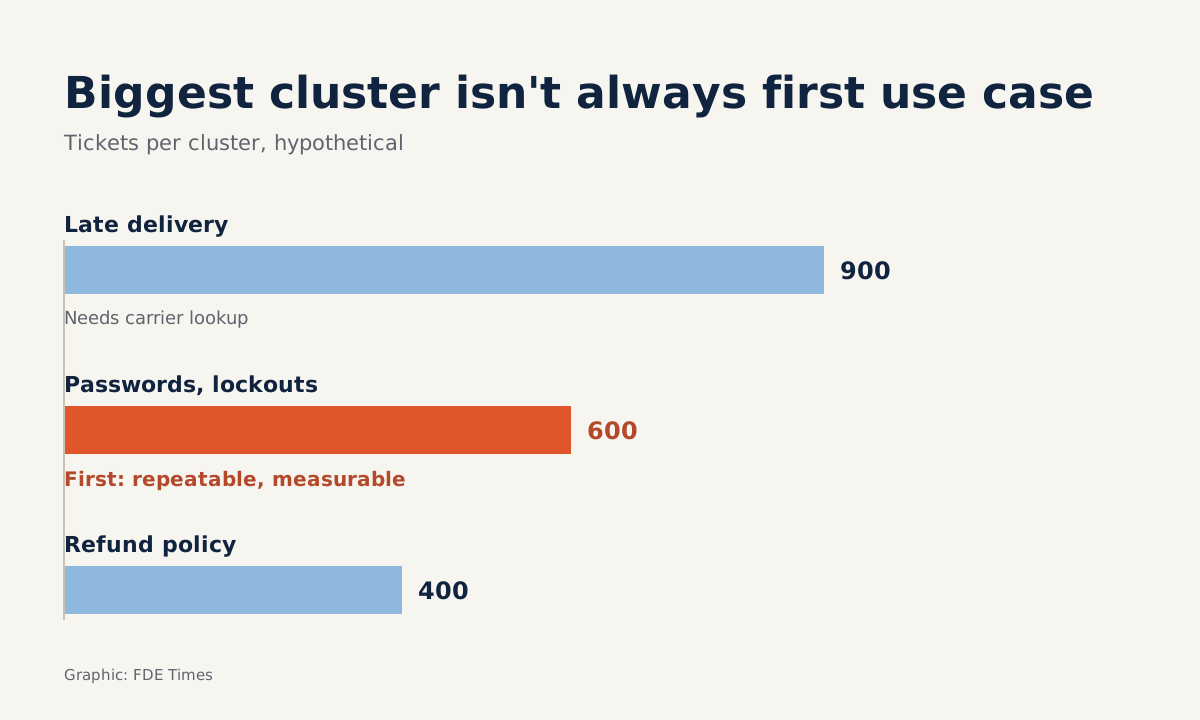
Not necessarily. This is where the FDE’s work begins, because the algorithm can only count. Picture the three clusters at the top of the table (the figures below are hypothetical):
| Cluster (hypothetical) | Tickets | Is the answer repetitive? | Is the outcome measurable? |
|---|---|---|---|
| Password resets, locked accounts | 600 | Almost always the same | Yes: self-resolution rate |
| Late delivery complaints | 900 | No, requires checking the shipping system | Hard, depends on partners |
| Refund policy questions | 400 | Yes, based on the policy document | Yes: compare with a reference answer |
The delivery cluster is the largest, but its answers depend on data out of your reach in the first week. The password cluster is smaller, but it is repetitive, low-risk and comes with a clear number to prove value.
That makes it a good candidate for the first use case, while the delivery cluster becomes the reason to ask for more access later on.
Common mistakes
The first mistake is running once and trusting the result. Clustering is sensitive to min_cluster_size, so always present results at two or more settings so the client can see which topics hold up when the parameter changes.
The second is treating LLM-generated names as settled conclusions. A name is only a hypothesis: have the support lead read it alongside a few sample tickets before it goes on a slide. The third is ignoring sensitive data. Mask personal information before embedding, even when the model runs on the client’s own infrastructure.
Where this skill shows up in real work
In the first week of an engagement, this topic table moves customer discovery from “we think” to “your own data shows”. It also becomes a baseline: once the agent is live, you re-cluster new tickets to see whether the password cluster has really shrunk.
If you want to move into an FDE role, do this exercise on a public dataset and write it up as a CV entry: number of tickets, method, clusters found, proposed use case and why you chose it.
The algorithm does the grouping and counting for you. What the client pays you for is choosing which topic to tackle first, and explaining why.
Was this article useful?
Thanks for the feedback!