The client follow-up email: write it in 15 minutes, with one owner and one deadline for every task
However good the meeting, it is worth little if nobody remembers next week what was promised. Here is an email template and five steps to finish it before your coffee goes cold.

In brief
- Record only decisions, action items and the points that need a reply from the client. Write each task as: task – owner – deadline.
- Every task gets exactly one owner and one specific date. Never "the team", never "soon".
- Keep the email very short (under 150 words in English) and send it within 24 hours of the meeting.
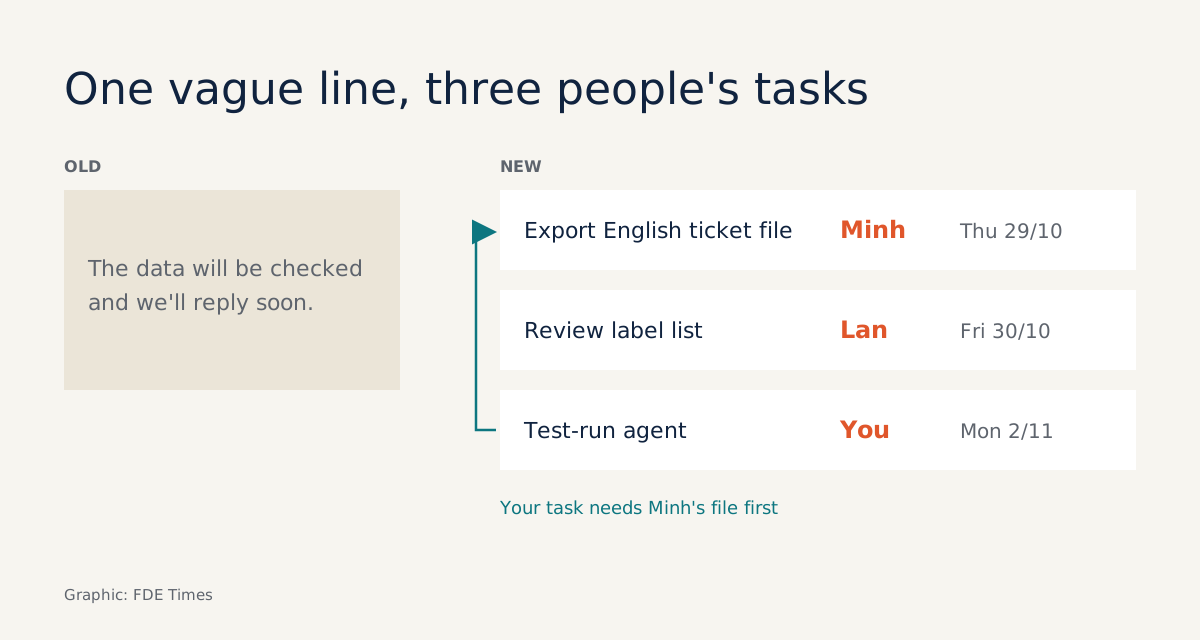
“The data will be reviewed and the team will get back to you soon.” It reads politely enough, but a week later nobody knows who was meant to review the data, or by when.
Willow Voice explains why the sentence fails: when a task is handed vaguely to the whole group, each person makes their own assumptions, and those assumptions are exactly what let the task slip through the cracks.
For a Forward Deployed Engineer this is not a question of style. GUVI’s guide to weekly check-ins for FDEs stresses that a short written summary prevents later disputes over what was discussed or promised.
On a live deployment, “what was promised” means the scope of work, the data the client has to hand over and the date you have to deliver.
This guide walks through a 15-minute process: the template, five steps to fill it in, a check after each step and the common mistakes. Everything follows a single hypothetical example, so that by the end you have an email ready to send.
What will you write, and what do you need?
The end product is a very short email; Vibe sets the limit at under 150 words. It keeps only three parts: decisions, action items with owners and deadlines, and open questions that need a reply.
You need three things: your raw notes from the meeting (typed or handwritten, either works), the list of attendees on both sides, and a calendar to fix dates. No special tools are needed. You can save the template below as a snippet in your email client:
Subject: [Project] – Meeting summary [date] – please confirm by [date]

Hi all,

DECISIONS
1. ...

ACTION ITEMS (task – owner – deadline)
1. ... – [one person's name] – [specific date, time zone]

OPEN QUESTIONS
1. ... – [who answers] – [by date]

Please confirm or send any corrections by [date].
If we hear nothing, we will proceed with the list above.
The hypothetical example used throughout: you are an FDE deploying an agent that automatically classifies support tickets for a logistics company. Today’s meeting is about getting historical ticket data for a trial run. On the client side are Lan, the operations lead, and Minh, a data engineer.
Step 1: the last two minutes of the meeting are worth more than fifteen afterwards
The 15-minute clock starts before the meeting ends. Before everyone leaves the room, read the decisions aloud and ask directly: “Who owns this, and by what date?” An answer at the table is far quicker than chasing one by email.
Check: in your notes, every action item has a name next to it. Wherever one is missing, mark it with “?” to deal with in step 4 rather than guessing.
Step 2: put only what was agreed under decisions
Minutes 0 to 3: open the template and copy in the decisions. A decision is something both sides agreed, not something someone merely raised. In the example, a decision might be: “Trial the agent on English-language tickets first; multilingual tickets come in a later phase.”
Granola notes that a decision with no named owner leaves nobody accountable for it. So if a decision creates work, move that work down to the next section, with an owner’s name.
Check: reread each line and ask: if the client read this, would they nod? If you are not sure they would, the line belongs under open questions.
Step 3: a task given to the whole team is a task nobody does
Minutes 3 to 8 are the most important part. Granola suggests a simple format: task, owner, deadline. Vibe is stricter: each item names exactly one person, one task and one date.
GUVI explains why this is worth doing: a named owner makes responsibility clear, important tasks are harder to forget, and vague promises such as “we’ll take a look” have nowhere to hide.
Applied to the example, the passive sentence at the top becomes:
Before:
The data will be reviewed and the team will get back to you soon.

After:
1. Export the English-language ticket file with customer details masked – Minh – Thursday 29 Oct
2. Review the list of classification labels – Lan – Friday 30 Oct
3. Run the agent on that file and send the classification results – [your name] – Monday 2 Nov
The old sentence actually contained three tasks for three people. Only once they are separated does it become clear that your task depends on Minh’s, a detail that returns later.
Check: search your draft for “team”, “will be”, “soon” and “ASAP”. If any remain, there is still something to fix. If the client is in another time zone, add the time zone next to each deadline, as GoTranscript’s template does.
Step 4: turn each question mark into a question with someone to answer it
Minutes 8 to 11: the items marked “?” in step 1 go under open questions. Each question follows the same rule as an action item: one person to answer, one date. For example: “Do the tickets contain customers’ phone numbers, and do they need masking before they are sent? – Lan to confirm – by Thursday 29 Oct.”
The confirmation line at the bottom of the email matters more than it looks. PostHog’s FDE handbook describes how the team writes scope into a short brief and sends it to the client for confirmation before committing. The follow-up email does the same thing on a small scale: the client confirms by a specific date, and the scope is fixed in writing.
GoTranscript’s template adds a sentence worth copying: if no reply comes, both sides proceed with the list as written. With that sentence in place, even if the client does not reply, everyone knows which list the work will follow.
Check: every question has a named person to answer it, and the confirmation line has a specific date.
Step 5: keep it very short, and send within 24 hours
Minutes 11 to 15: cut. Long thank-yous, a blow-by-blow account of the meeting and explanations of reasoning can all go. The 150-word limit forces you to keep only what the reader has to act on.
The 150-word mark was set for emails in English. If you write in another language, such as Vietnamese, keep its spirit: cut all the narrative, but never cut a name or a deadline.
On timing, both Willow Voice and Granola advise sending within 24 hours of the meeting. Fitting the process into 15 minutes is precisely what lets you do it as soon as you leave the room, rather than letting it slide to the next day.
Check: the email has all three parts, no recap of the meeting remains, and it went out within 24 hours.
What does an FDE’s email need beyond a standard template?
Common meeting-email templates stop at task – owner – deadline. On a deployment there are two more things that generic templates rarely mention: the chain of dependencies between the client’s tasks and yours, and the scope boundaries the client needs to sign off.
Back to the example. Your Monday 2 Nov deadline holds only if Minh’s file arrives on Thursday 29 Oct. So note the dependency on your own line:
3. Run the agent and send the classification results – [your name] – Monday 2 Nov
   (needs Minh's file from item 1; if the file is late, this deadline moves with it)
Imagine the file arrives on Friday instead of Thursday. You only need to reply in the same email thread: the file came a day late, so the trial results move to Tuesday 3 Nov. Nobody has to argue, because the original email recorded who delivers what, on which date, and which task waits on which.
Scope is the other matter. The decision to “run English-language tickets first” sounds like a technical detail, but it is really a scope boundary.
If, a few weeks later, someone on the client side asks why the agent does not yet handle multilingual tickets, the answer is already in an email the client confirmed: exactly the kind of dispute GUVI says a written summary helps prevent.
The advice: whenever a decision in a meeting narrows or widens what you have to deliver, put it at the top of the decisions section and mention it in the confirmation line.
Which mistakes make the email useless?
The most common mistake is turning the email into minutes. You recount every opinion from the meeting, and the action items sink into the final paragraph. A close second is giving one task to two people who “share ownership”: with two names, each finds it easy to assume the other is on it.
A harder mistake to spot is recording only the client’s tasks and leaving out your own. The client reads it and sees you simply handing them work. When your tasks are written down too, with the dependency as shown above, the client sees that both sides have work to do and deadlines to keep.
What does this email thread do for you at the client?
During a deployment, the follow-up email is what helps everyone remember where the project stands. When someone new joins on the client side midway, or a deadline arrives and the data has not, a thread with names and dates answers the question in a single forward, instead of another meeting to reconstruct who said what.
For your career, this skill is easier to demonstrate than you might think. On your CV, instead of writing “strong communication skills”, describe how you kept up a follow-up email after every client meeting, with action items that had owners, deadlines and scope confirmed by the client.
When interviewing for client-facing roles, bring a sample with all client details removed. A real, short email with names, dates and a dependency line is more convincing than any self-description.
The next time someone says “the team will look into it and get back to you soon”, you will know the next question to ask: who on the team, by what date, and how far is your own task waiting on it.
Was this article useful?
Thanks for the feedback!
6 sources
- How forward deployed engineers work - Handbook
- The Weekly Client Check-In: A Template for Forward Deployed Engineers · 2026-09-28
- Follow-up email after meeting: Templates and examples that work
- How to Write Meeting Follow-Up Emails (Oct 2026) · 2026-10-24
- How to Write a Follow-Up Email After Meeting · 2026-08-28
- Client follow-up email template: confirm next steps, owners, deadlines