The free security course to take before touching a client's API
PortSwigger's Web Security Academy covers APIs, authentication and SSRF, the three topics that teach FDEs to see their own integrations the way an attacker does.
In brief
- PortSwigger's Web Security Academy is entirely free, with content from the company's research team and Dafydd Stuttard, author of The Web Application Hacker's Handbook.
- For FDEs, the three topics most worth learning are API testing, authentication and SSRF, because those are exactly what you build at a client.
- Burp Suite Community Edition is enough for most labs; the paid BSCP certification is optional.
Some of the authentication labs in Web Security Academy hand you a list of candidate usernames and passwords, then set the task: find the real account and log in. No slide deck can replace the feeling of breaking, with your own hands, a login form that looks perfectly ordinary.
The course is made by PortSwigger, the company behind Burp Suite. It calls the academy an online training centre for web application security and says it is 100% free. The content comes from PortSwigger’s research team and Dafydd Stuttard, author of The Web Application Hacker’s Handbook.
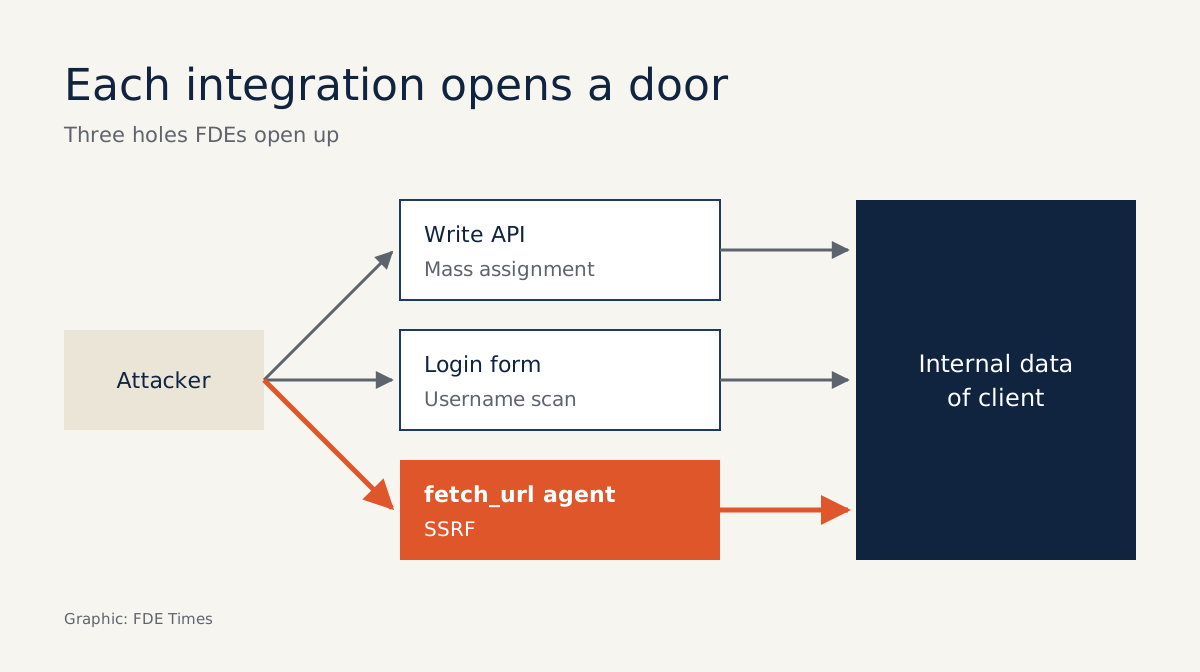
This matters to FDEs because your job is connecting systems: calling a client’s API, building a login page for a demo, writing an agent that can fetch a link on its own.
Each of those opens another way in. Far better to practise attacking a system you are allowed to break than to wait for the client’s security team to find the hole in your code.
A lab, not a textbook
A beginner’s guide published in 2026 counts 31 topics and hundreds of labs in the academy, split into three levels: Apprentice, Practitioner and Expert.
PortSwigger describes its labs as realistic puzzles built to test your skills as an attacker. You create an account to track progress, work up from Apprentice to Expert and see your ranking in the Hall of Fame.
Since September 2023 the academy has offered learning paths, ready-made routes that stop newcomers getting lost among so many topics. The first two to launch were an overview of server-side vulnerabilities and SQL injection.
According to the same guide, the free Burp Suite Community Edition is enough for most labs; only the labs that need Collaborator and the certification exam require the Professional edition.
One person who has passed OSWE wrote in a review that the labs cover almost every common vulnerability, and regarded the academy as an excellent complement to formal courses. With a lab library that broad, though, an FDE need not do all of it. Three ideas are worth keeping above the rest.
Idea one: your API accepts more parameters than you think
The API testing topic focuses on RESTful and JSON APIs and covers three things: probing API documentation for reconnaissance, mass assignment and server-side parameter pollution. PortSwigger warns that mass assignment, also called auto-binding, can inadvertently create hidden parameters.
Imagine you write PATCH /api/users/me so a client’s employees can change their email. The framework binds the entire JSON body straight onto the user object. A user only has to send an extra "role": "admin" to grant themselves higher privileges, even though the API documentation never mentions that field.
The difference between vulnerable and locked-down code is often a few lines:
# Before: bind the whole JSON body to the model
user.update(**request.json)  # sending an extra "role": "admin" gets through

# After: accept only the permitted fields
ALLOWED_FIELDS = {"email", "display_name"}
data = {k: v for k, v in request.json.items() if k in ALLOWED_FIELDS}
user.update(**data)
The first thing to do at a client: for every endpoint that writes data, list the fields it may accept and block everything else. It is also worth rereading the API documentation you publish through the eyes of someone doing reconnaissance.
Idea two: login bugs are security bugs
The authentication topic stresses that authentication vulnerabilities give attackers access to sensitive data and functionality. Many of its labs have you enumerate usernames and then brute-force passwords. That is also where it is easiest to slip when you are rushing to build a login portal for a pilot.
A simple example: a login form returns “Account does not exist” for a wrong username and “Wrong password” for a wrong password.
Those two different messages alone are enough for an attacker to filter out a list of real accounts, then concentrate on guessing the password for each one. The fix is to merge both branches into a single response:
# Before: two different messages, revealing which usernames exist
if user is None:
    return error("Account does not exist", 404)
if not check_password(user, password):
    return error("Wrong password", 401)

# After: every failure looks exactly the same
if user is None or not check_password(user, password):
    return error("Incorrect username or password", 401)
So before handing over a demo, make every failed login return the same message and the same status code, and limit the number of attempts.
Idea three: an agent that can fetch URLs is a gateway to SSRF
Server-side request forgery happens when an attacker tricks a server into sending requests on their behalf. PortSwigger writes that a successful SSRF attack often results in unauthorised actions or access to data within the organisation.
For FDEs working on AI, this is the most important of the three. Imagine giving an agent a fetch_url tool that runs inside a client’s internal network. One cleverly worded prompt asking it to read the address of an internal service, and the agent will obligingly carry that data out. Webhooks and “import data from a link” features carry exactly the same risk.
What to do: write a list of domains the tool is allowed to call, block internal address ranges, and put this in the design document before the client’s security team has to ask.
A bad fix is worse than no fix
The easiest trap to fall into is using a blocklist instead of an allowlist. Banning localhost and a few internal IP ranges for a fetch_url tool sounds sufficient, but a blocklist only has to miss one way of writing an address to leak.
An allowlist is much tighter, but not watertight either. An allowed domain with an open redirect can still send the request to an internal address, and DNS rebinding can make a domain point to a different IP after you have checked it.
So check the IP again after resolution, immediately before connecting, and either turn off automatic redirect following or check each redirect hop as a new request.
Mass assignment is the same. If you block only the role field, the endpoint is exposed again as soon as the model gains a new sensitive field and nobody remembers to update the blocklist.
The next trap is limiting login attempts by IP alone. An attacker who changes IP makes that limit meaningless, so count failed attempts per account as well. And once you have merged the error messages, check the status codes too, to be sure the two failure cases really do look identical.
What order to learn in, and what to put on a CV
The course suits engineers with a few years of experience who are comfortable with backend code but have never looked at a system from the attacker’s side. Start with the server-side vulnerabilities learning path. Then do authentication, then API testing, and finally SSRF. Within each topic, finish the Apprentice labs before moving to Practitioner, and leave the Expert labs for later.
Burp Suite Certified Practitioner (BSCP) is the official certification but it is optional, costs money and requires an active Burp Suite Professional subscription. It is only worth sitting if you are aiming for FDE roles with a strong security focus.
On your CV, do not just write “knows web security”. Say specifically which Practitioner labs on APIs, authentication and SSRF you have completed, and add a short write-up of how you locked down an agent tool against SSRF.
In an agent design interview, raising allowlists, post-resolution IP checks and redirect handling before the interviewer gets the chance to ask is a very clear signal.
Clients will not ask how many labs you have solved. They will ask whether your integration is safe, and the most credible answer is one you have tested yourself on a system you were allowed to break.
Was this article useful?
Thanks for the feedback!
9 sources
- Web Security Academy (PortSwigger)
- Server-side request forgery (SSRF) - Web Security Academy
- Authentication vulnerabilities - Web Security Academy
- API testing - Web Security Academy
- New learning paths, from the Web Security Academy · 2023-09-13
- Getting started with the Web Security Academy
- Burp Suite Certified Practitioner (PortSwigger)
- PortSwigger Web Security Academy: Beginner's Guide (2026) · 2026-10-25
- OSWE / WEB-300 Review