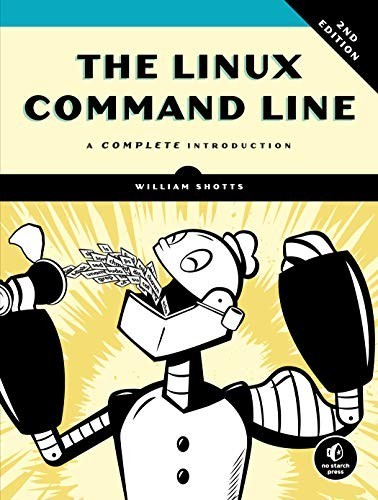
William Shotts's The Linux Command Line: the shell basics an FDE needs before SSHing into a client's server
When you log in to a client's server, there is no graphical interface to fall back on. This free book teaches the groundwork you need for that moment.
In brief
- The author offers the PDF as a free download under a Creative Commons BY-NC-ND licence. The 544-page third print edition is published by No Starch Press.
- The book is written for readers who know nothing about the command line. The companion tutorial includes sections on Permissions, Job Control, I/O Redirection and Expansion.
- Four habits worth keeping: chain commands instead of clicking, preview what a wildcard expands to, read file permissions before asking for sudo, and keep processes alive when SSH drops.
Picture this: you SSH into a client’s virtual machine to find out why a data pipeline has stopped running. Your IDE is not there, nor are the aliases your fingers know, and someone on the client side is waiting on the call.
How the first few minutes of that session go depends on how well you know the shell. The Linux Command Line by William Shotts teaches exactly that groundwork, and you can download the PDF free from the author’s site, LinuxCommand.org.
A book for people starting from zero
A review in Linux Pro Magazine noted that the book assumes no prior knowledge on the reader’s part. According to the review, it is probably the most readable book on the subject, while still covering it with enough breadth and depth.
The publisher promises more: a complete course in how Linux really works. The book covers navigating the file system, pipelines, processes, Vim and shell scripting.
It is worth knowing the limits from the start. Shotts makes clear that Adventures with the Linux Command Line, the companion volume, is not a system administration manual, just a collection of interesting topics such as Midnight Commander, terminal multiplexers, AWK, Vim and SQL.
For an FDE, reading logs, moving files and running jobs come first; deep server operations can be learned from other sources later.
Four habits to keep after you close the book
Chain commands instead of clicking. The Learning the Shell tutorial opens with the observation that graphical interfaces are useful for many tasks but not for all of them. On a client site, that becomes very concrete.
Take a hypothetical case: the client reports a full disk. You type df -h to find which partition is full, then du -sh /var/log/* | sort -h | tail -5 to get the five largest log directories. Two commands, and you have the answer while still on the call.
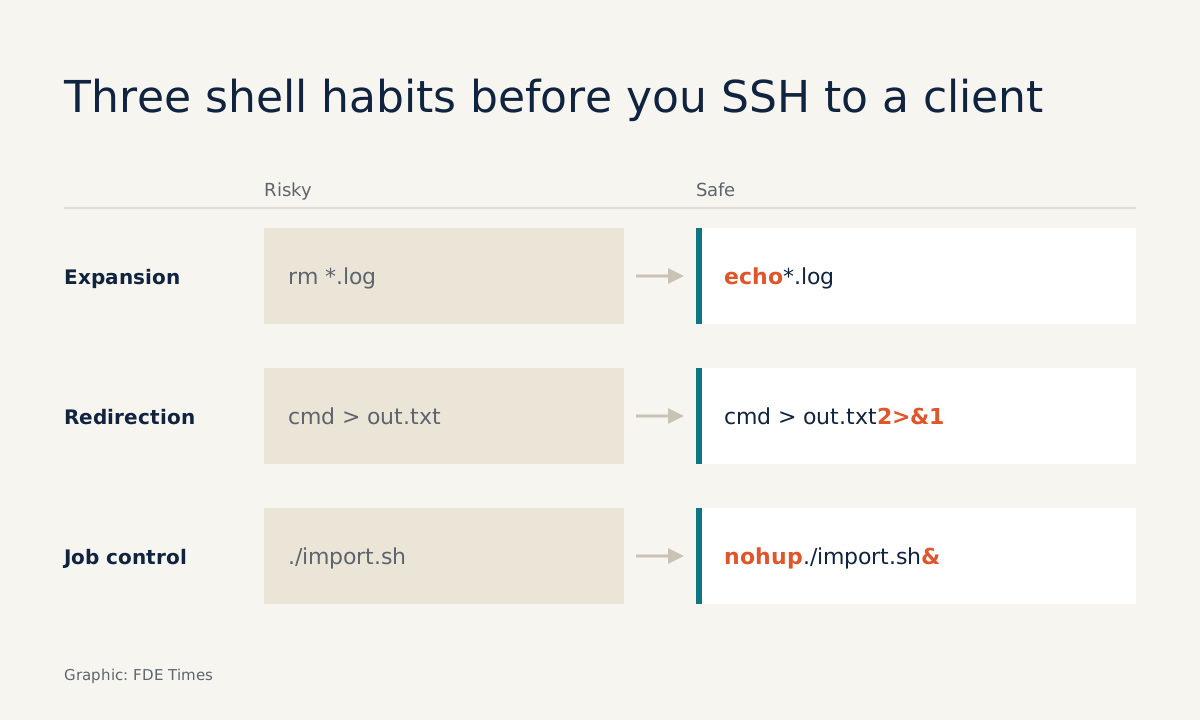
Preview what the shell will turn your command into. I/O Redirection and Expansion are two of the tutorial’s ten sections, and both can cause costly mistakes on someone else’s machine. To send a log to a teammate, command > output.txt 2>&1 writes both output and errors to one file; without 2>&1, the file you send may be missing the very line that reports the error.
Expansion is more dangerous still. Before running rm with a wildcard on a client’s machine, run echo with the same wildcard to see which list of files it will become.
Read file permissions before asking for sudo. Permissions is another section of the tutorial. When you hit “Permission denied” in a client’s data directory, read ls -l to see which user and group own the file before turning to the client; asking the right question earns you more respect from their IT team.
Keep processes alive when SSH drops. Job Control saves you when an import is half done and the SSH session drops. The safest approach is to detach it from the session from the start, for example nohup ./import.sh > import.log 2>&1 &, then follow it with tail -f import.log.
If you have already started it in the foreground, press Ctrl+Z, type bg, then disown. For work that runs for hours, opening tmux before you start is a good habit; terminal multiplexers are also one of the topics in Adventures.
In what order should you read it?
Newcomers to the command line, or engineers used to working on macOS and in an IDE, should start with the ten sections of Learning the Shell. Type out every command on a clean virtual machine; do not just read.
Then read the book for depth, and leave Adventures until last, once the basic commands have become reflexes. If you already write bash scripts every day, skim it and stop only at the chapters where you still hesitate at the keyboard.
As for job hunting: when you read FDE job ads, look at whether the role involves working on client infrastructure; if it does, shell fluency is worth demonstrating. Instead of writing “proficient in Linux” on your CV, describe a specific incident: whose machine, what you typed, how long it took.
Are you ready to SSH into a client’s machine?
Try to answer the three questions below before reading the answers, then run them on a virtual machine.
Question one: what is the difference between command 2>&1 > out.txt and command > out.txt 2>&1? Answer: the shell reads redirections from left to right. In the first form, errors are pointed at wherever output points at that moment, which is the screen, so the file contains only the output; only the second form collects both in the file.
Question two: in a directory containing a.tmp, b.tmp and config.yaml, what does echo rm *.tmp print? Answer: rm a.tmp b.tmp. If the printed line includes a file you do not want to lose, you have just avoided an incident.
Question three: a script has been running in the foreground for 40 minutes and the network is unstable. What do you do so you do not lose the job if the SSH session drops? Answer: Ctrl+Z, bg, disown. The most common mistake is pressing Ctrl+C out of reflex, and 40 minutes of work is lost.
If you can answer all three without hesitation, you have the groundwork the book promises. If you stumble, go back to the matching section of the tutorial.
Before you download or buy
The free version on LinuxCommand.org is the Seventh Internet Edition, 596 pages long, released under a Creative Commons BY-NC-ND licence. No Starch Press’s third print edition runs to 544 pages, ISBN 9781718504523, and the publisher describes it as having nearly 40 pages of new material.
Release dates vary by format: Apple Books lists the ebook on 17 February 2026, while Penguin Australia lists the paperback on 3 March 2026. Any edition will do, as long as you type the commands on a virtual machine before you have to type them on a client’s.
Was this article useful?
Thanks for the feedback!