The generative AI evals course where LLMs get 14 of 47 minutes
The rest still repays a look, because its habits of logging every run and versioning data carry over to any stack.
In brief
- The course has about 47 minutes of video and launched in August 2023, but only one 14-minute lesson deals directly with LLM evaluation and tracing.
- It is an MLOps tooling course built on W&B, aimed at people already comfortable with Python and PyTorch, and it stops at the development stage.
- What is worth taking away is the habit of logging config, versioning data and tracing prompts, not the W&B interface.
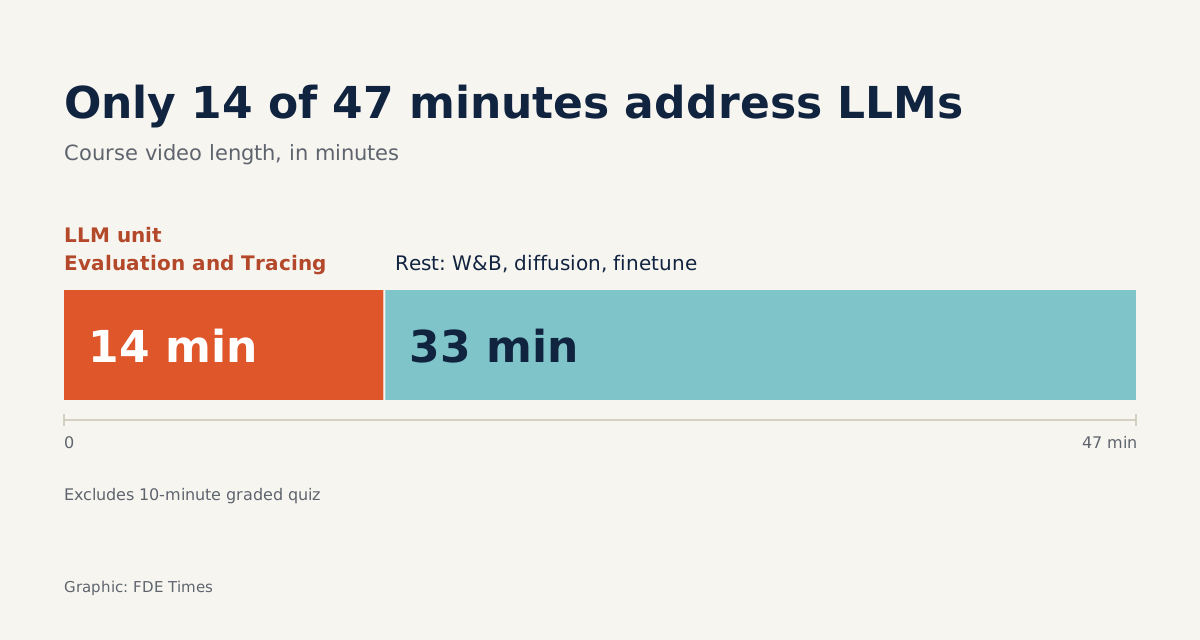
Evaluating and Debugging Generative AI has about 47 minutes of video, plus a graded 10-minute quiz. The material that deals directly with LLM evaluation and tracing fits into a single 14-minute lesson.
That figure does not make it a bad course. It shows what kind of course it is: MLOps tooling, built on Weights & Biases. DeepLearning.AI announced its launch in August 2023. For an FDE who has to prove that an agent works on real data, the job is to pick the right lessons and come away with the right habits.
A course about tools, taught by a toolmaker
The instructor is Carey Phelps, founding product manager at Weights & Biases. The launch announcement says plainly that learners will use the W&B platform to track experiments, and W&B asks that you have a W&B account and know Python, PyTorch or a similar framework. The course is rated intermediate.
The official course page, by contrast, promises to teach how to evaluate LLM-based programs and image-generation models with “platform-agnostic tools”.
The two descriptions do not quite line up. The sensible reading is that the tool is W&B, and what is platform-agnostic is the method.
The course is free while DeepLearning.AI’s learning platform is in beta, and that may change.
Who are the other 33 minutes for?
The seven video lessons cover four areas: instrumenting code with W&B, training and evaluating a diffusion model, evaluating and tracing LLMs, and finetuning a language model. The course limits its own scope to tracking and debugging models “during development”.
That last detail is the one FDEs should notice. Most of your trouble happens after that stage, once an agent has touched a customer’s real data. The course gives you the kit to record everything; deciding what to record in production is up to you.
So watch in this order. Start with the W&B instrumentation lesson to understand how logging works, then go straight to LLM Evaluation and Tracing. Watch the finetuning lesson only if a customer genuinely wants to tune its own model. Skip the diffusion lesson unless your project generates images.
Three ideas worth taking away
A summary by the MLOps Community draws out three habits, and all three apply whether or not you ever touch W&B. The first is config management: every run records the full set of parameters it used, so you never have to guess “what settings did we run that with?”
The second is versioning datasets and models as artifacts. An eval set is data too. If you add 20 hard cases to your test set without giving it a new version, this week’s scores and last week’s can no longer be compared.
The third is tracing prompts and responses over time, especially in complex chains of interaction. In the LLM lesson, the instructor notes that generative model outputs are harder to evaluate. Precisely because they are hard to score with a single number, you need to keep every turn verbatim so you can reread and compare them.
How those habits save you at the customer’s site
Picture an insurance customer using an agent to summarise claims files. On Monday you change the system prompt and add a tool-calling step. By Thursday the customer’s team reports that the summaries are “worse than before”.
Without traces, that day’s meeting is an argument about impressions. With them, you know exactly which prompt version and which eval set produced each output. You rerun both versions on the same 50 sample files, put the results side by side, and show in which cases the new tool call drops detail.
You answer the customer with concrete examples, not promises. That is why the 14-minute lesson deserves a second viewing: not to memorise the W&B interface, but to build the reflex of recording every run before anyone complains.
How to put it on your CV
When you read FDE job ads, look for words such as evals, tracing or observability. Where they appear, that is where to offer these three habits as evidence.
Do not write “completed Evaluating and Debugging Generative AI” and leave it there.
Rebuild the three habits on a small LLM application using a stack of your choice, then write a line like: “Added tracing and a versioned eval set to an internal chatbot, catching a regression after a prompt change.” A recruiter reading that sees exactly the skill the course sets out to teach.
Watching 47 minutes is easy. What marks out a good FDE is that the first time a customer says “worse than before”, the records are already there to open.
Was this article useful?
Thanks for the feedback!
6 sources
- Evaluating and Debugging Generative AI (DeepLearning.AI)
- Evaluating and Debugging Generative AI – DeepLearning.AI · 2026-05-14
- SHORT COURSE IS LIVE! Evaluating and Debugging Generative AI · 2023-08-02
- Announcing our Brand New Generative AI Course with Andrew Ng and DeepLearning AI (Weights & Biases) · 2023-08-02
- Evaluating and Debugging Generative AI (MLOps Community) · 2023-08-11
- LLM Evaluation and Tracing with W&B (DeepLearning.AI lesson 5)