Practising Sierra's AI-native onsite: a 90-minute session building a feature with a coding agent
The interviewer leaves the room, and you are alone with a coding agent and a half-formed idea. What gets graded is your judgement, not how many lines of code you produce.

In brief
- Sierra's real round has three parts, Plan, Build and Review, and Build alone lasts 2 hours. The 90-minute session here is deliberately compressed so you get used to working under heavier time pressure.
- The agent helps you write code faster, but scope, the cut-off and when to pivot remain your decisions.
- Each round has its own rules on AI use, and the invitation you receive is the final word.
At some point in Sierra’s AI-native onsite, the interviewer stands up and leaves the room. From then on you have 2 hours to turn the idea you have just defined together into a working product. You may pivot or narrow the scope at any time.
Sierra says this format makes it easier to see whether a candidate has agency, for instance whether you change direction when you get stuck. For an FDE, it is also the skill of the first week at a customer: requirements are vague, time is short, and every cut has to be explained to someone else.
This article shows you how to set up a 90-minute practice session on your laptop. The real round is not that short: Sierra’s Build phase alone lasts 2 hours, before Plan and Review. Squeezing all three phases into 90 minutes is deliberate, so you get used to cutting scope under more time pressure than the real thing.
How does the real round work?
Sierra splits the round into three parts. In Plan, you and the interviewer work together to define the product you will build. In Build, the interviewer steps out and you build the product on your own in 2 hours.
In Review, the two of you debate the main product flows and the choices you made. The interviewer then reads your code to assess your engineering judgement.
When you plan, remember what Sierra has made explicit: you may cut scope as you go and skip boilerplate such as CRUD or auth to concentrate on what makes the product distinctive. With only a few hours, that permission is valuable.
Do not assume every round works this way. According to a guide from Aced (formerly Exponent), the hiring process for agent engineers includes a 60-minute onsite debugging round in TypeScript and React.
Aced also notes that Sierra has announced changes to some rounds. Another guide, on PracHub, points out that each round may have its own rules on AI use, and that the invitation you receive is the final word.
What to prepare before starting the clock
You need a laptop with the coding agent you use every day, an empty repo, a timer and someone to play the interviewer. If you practise alone, write five probing questions in advance to answer yourself at the end. According to Aced, the whole hiring process usually takes 2-5 weeks.
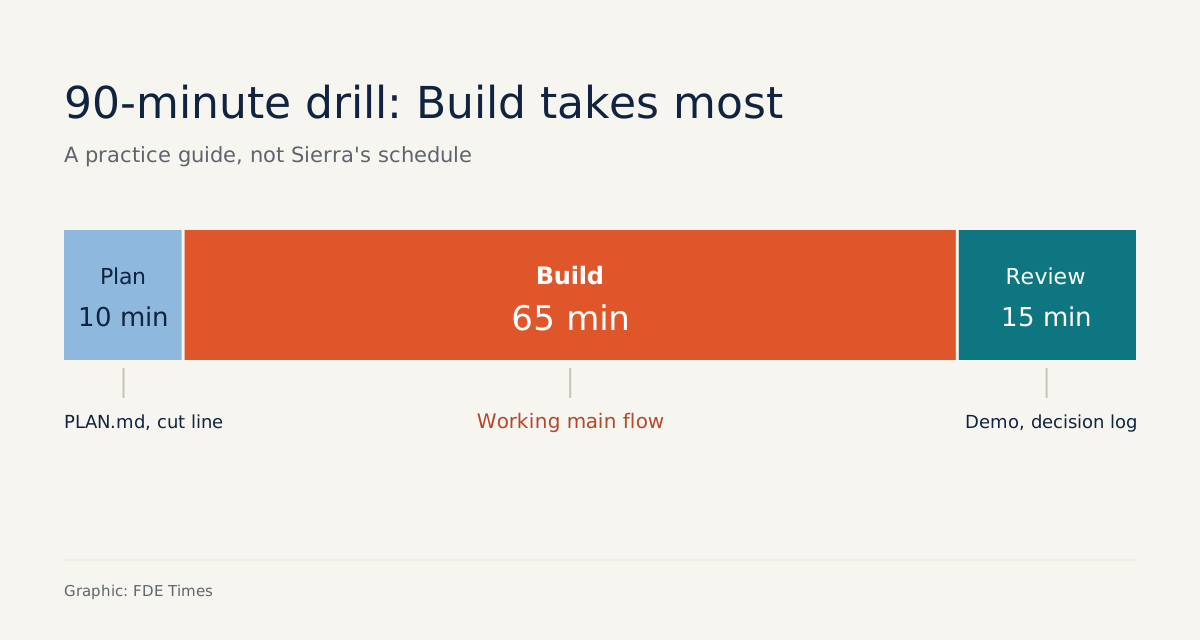
The table below suggests how to split the 90 minutes. It is not Sierra’s schedule:
| Phase | Practice time | Required output |
|---|---|---|
| Plan | 10 minutes | PLAN.md with the main flow and a cut-off |
| Build | 65 minutes | Main flow working, with checks and error handling |
| Review | 15 minutes | Demo and decision log |
Step 1: Plan in 10 minutes and write the cut-off down
Imagine the stand-in interviewer sets this problem: the customer support team needs a screen showing which conversations should be handed to a human, and why. A brief like that is vague. In these 10 minutes you must ask enough questions to narrow it, then write it down:
# PLAN.md
User: support shift lead, checks at the start of the shift
Main flow: load sample conversation list -> flag "needs human" + reason -> filter by flag
Data: sample JSON file, 20 conversations (skip CRUD: static data is enough to prove the flow)
Skip: login (skip auth: single user, runs locally)
Cut-off: once the main flow works -> stop adding features, move to checks, errors, demo
Fallback: if flagging is stuck for more than 15 minutes -> use simple keyword rules
Both “skip” lines come with a reason, and that is intentional. The PracHub guide advises skipping boilerplate only when you can explain why clearly, and setting a cut-off in advance: once the main flow works, move on to checks, error handling and the demo.
A quick test: if the stand-in interviewer reads PLAN.md and cannot tell where you will stop, the plan is not good enough.
Step 2: Tell the agent what it cannot see
Claude Code’s best-practices documentation sums up working with an agent in three ideas: tell the agent what it cannot see, give it a check it can run itself, and apply rules that have no exceptions.
The principle works with any coding agent. Before writing the first line of code, turn it into a short brief file:
# AGENT.md (short version)
Context: internal tool for support shift leads; runs locally only.
Do not build: login, database, admin pages.
Required check after every change: run the test suite; 3 sample conversations
  with known outcomes must get the correct flag.
Hard rules: no new libraries without asking; change one part at a time.
The most important part is the three conversations with known answers. The agent uses them as its check, and you use them as evidence in Review. This is a simplified version: in the real round, write the check in the test framework you know best.
Step 3: Build to the cut-off, then stop polishing
Keep the loop short: give the agent one small task, run the check, read the diff, and only then hand over the next task.
The PracHub guide draws the roles clearly: the agent is a tool for speeding up implementation, and you are the product owner.
When you accept a diff you cannot explain yourself, you have handed ownership of the product to the agent.
Each time you change course, write one line in the decision log. It takes less than a minute and will help you a great deal in Review:
# DECISIONS.md
[minute 32] Model-based flagging gave unstable results on the 3 test samples
  -> switched to keyword rules + length threshold. Reason: need a reliable flow first.
[minute 51] Main flow works. Hit the cut-off -> stopped adding the date filter.
[minute 55] Added handling for broken JSON file: show a message instead of a blank screen.
The minute-32 line is exactly what Sierra wants to see: when stuck, change direction instead of digging deeper. Sierra allows pivoting and narrowing scope as you work. Because the 15-minute threshold was written into PLAN.md in advance, you make that decision with a clear head, not in a panic.
Step 4: Rehearse Review as a real debate
Sierra’s Review has two layers: a debate about product flows and a code reading to assess engineering judgement. The stand-in interviewer should push back for real. Why does the shift lead need to filter by flag first? Why drop the date filter? Where is the code that handles broken files?
For each question, you should be able to open two things: a line in DECISIONS.md and a piece of code whose every branch you can explain. If the agent wrote a section, say so plainly, then explain why you kept it.
The PracHub guide warns never to use an assistant to get around a stated rule, and never to hide who wrote the code.
Mistakes that make the practice worthless
The most common mistake is letting the agent decide for you. You ask the agent “what should I do next” and follow it, so in Review you have no story of your own to tell. The second is spending the first 20 minutes on login and a database, even though Sierra allows you to skip them.
The third is hitting the cut-off and not stopping. An extra feature added at minute 70 is almost never worth as much as error handling and a demo that runs smoothly.
The last is practising every round the same way. The 60-minute TypeScript and React debugging round that Aced describes needs a different kind of preparation, and its AI rules may differ too.
Where does this skill show up at a customer?
Replace the interviewer with the customer’s head of operations, and the 2 hours with a short sprint before a demo. The steps are the same: define the main flow with them, write down what you are skipping and why, stop at the cut-off, then defend each choice to people who were not sitting next to you while you coded.
For your job applications, each practice session leaves three things worth adding to a portfolio: PLAN.md, DECISIONS.md and a working repo. On a CV, a line such as “built a prototype in 2 hours with a coding agent, documenting scope cuts and pivots” is more convincing than a list of tools.
When reading FDE job descriptions, look for phrases such as scoping, prototyping or working with ambiguity. They often signal that the role values exactly the kind of skill you have just practised, and they are a good place to tell the story in your DECISIONS.md.
In an interview like this, the coding agent sits in the room with you. What employers want to see are the decisions only you can make.
Was this article useful?
Thanks for the feedback!