When a client's system floods you with data: queues, competing consumers and back-pressure
Clients will never send data at the pace you want, so your system has to decide for itself how fast it takes work in.

In brief
- Put a queue between the client's system and your workers to absorb bursts, then let several workers compete to process the messages.
- Back-pressure lives on the consumer side: cap unacknowledged messages, set timeouts that match real processing time, and scale on queue depth.
- Ordering is not guaranteed and messages can arrive twice, so consumers must be idempotent and backed by a DLQ.
Picture this: a client’s ERP system runs its end-of-day sync job and fires 50,000 orders at your webhook in ten minutes. Each order needs a model call, a database write and a push of the result to the CRM. Your API starts timing out, the client’s side retries on its own, and the next morning you are cleaning up orders that were written twice.
Anyone who builds integrations with client systems should prepare for this kind of situation in advance. You do not control the client’s system, and you cannot ask them to “send more slowly”. What you do control is how your own system takes in work, and that skill rests on three ideas: pub/sub, competing consumers and back-pressure.
A queue does not make you faster; it lets you choose your speed
The mistake in the example above is that the webhook both receives and processes. The fix is to split the two: the webhook only writes a message to a queue and returns 200 immediately, while a pool of workers pulls messages off and processes them at their own pace.
Microsoft’s architecture documentation describes exactly this role: the queue is a buffer between the sender and the processing instances, smoothing out traffic as it rises and falls.
When several workers read from the same queue, you have the competing consumers pattern: the workers compete, and each message goes to only one of them. Pub/sub is the opposite: every subscriber receives every message. The core difference is who receives each message, and it determines how you design your topology.
In practice you usually need both. A “new order” event is published once; a “risk scoring” subscriber and a “CRM sync” subscriber each get their own copy. Inside each subscriber sits a pool of competing workers. There is a bonus: one subscriber failing does not bring down the publisher or the other subscribers, and the broker holds its messages until it recovers.
Where does back-pressure live?
A queue can absorb the burst, but if workers greedily pull too many messages at once, the pressure simply moves from the webhook to the workers’ RAM.
Microsoft’s pub/sub guidance sets a clear order of priority: first use the broker’s flow control to limit the number of unacknowledged messages per subscriber, and only then scale out with competing consumers when flow control is not enough.
Each broker puts this control in a different place, under a different name:
| Broker | Where to tune back-pressure | What to remember |
|---|---|---|
| RabbitMQ | prefetch (basic.qos) |
A value of 0 means no limit on unacknowledged messages |
| Celery | worker_prefetch_multiplier |
For long-running tasks, set it to 1 so workers do not hoard work |
| Amazon SQS | visibility timeout | Defaults to 30 seconds; standard queues cap at about 120,000 in-flight messages |
| Kafka | pull model + consumer groups | Plan partition count up front: each partition belongs to only one consumer in a group, so partition count is your ceiling on parallelism |
Kafka deserves a separate note. Because consumers pull data themselves, Kafka’s design documentation points out that a slow consumer simply falls behind and catches up when it can. Back-pressure comes almost for free. The trade-off is that if a topic has 6 partitions, a seventh consumer in the same group sits idle, so work out the parallelism you need when you design the topic.
A worked example, end to end
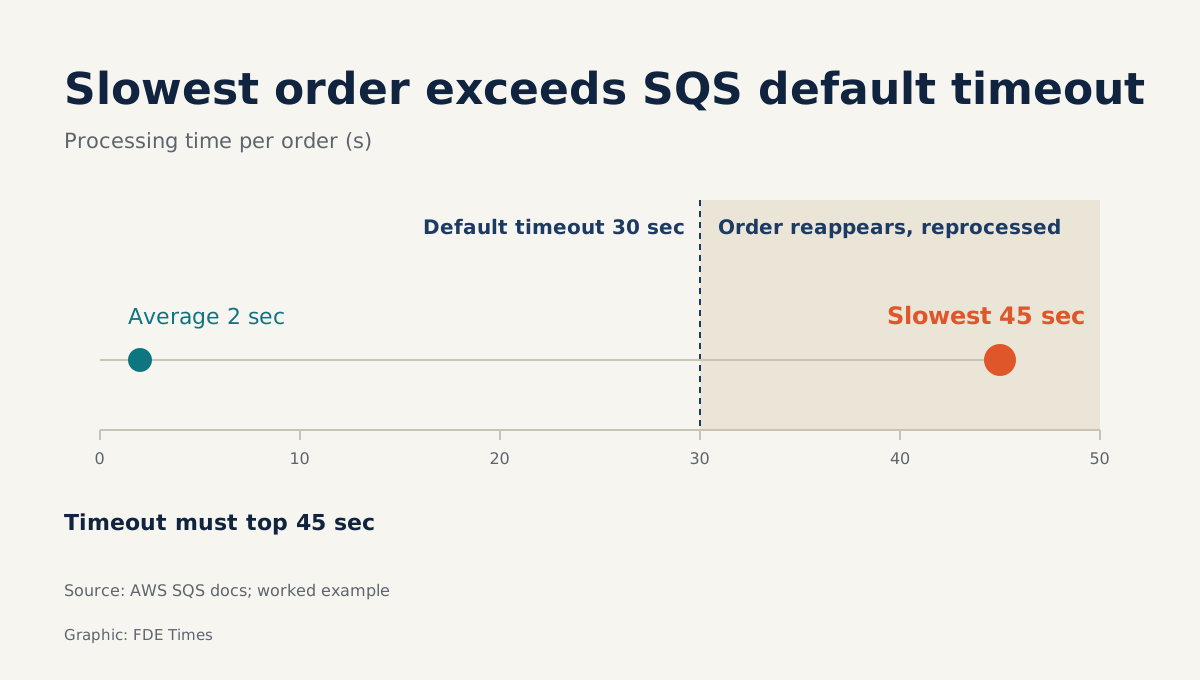
Back to the 50,000 orders. Suppose each order takes 2 seconds on average, and 45 seconds at worst when the model is slow to respond. The total workload is 100,000 worker-seconds; with 20 workers, the queue drains in about 5,000 seconds, or just over 83 minutes. The first question for the client: do the results need to be done in under 83 minutes? If so, you immediately know how many workers you need.
Now for the trap. If you use SQS with the default 30-second visibility timeout, any order that runs for 45 seconds reappears in the queue before the worker can delete it, and another worker picks it up.
That mechanism exists to rescue work from crashed workers, but here it creates duplicates. Set the timeout above the slowest processing time you have actually measured.
Even with the right timeout, AWS states plainly that SQS delivers at least once, so there is no absolute guarantee a message will not arrive twice. Microsoft also notes that the order in which consumers receive messages does not reflect the order in which they were created. So consumers must be idempotent:
def handle(msg):
    key = f"{msg['order_id']}:{msg['version']}"
    with db.transaction():
        if db.exists("processed_keys", key):
            return  # duplicate, skip
        if db.current_version(msg["order_id"]) > msg["version"]:
            return  # stale version arrived late, skip
        upsert_order(msg)
        db.insert("processed_keys", key)
(The comments read “duplicate, skip” and “stale copy arrived late, skip”.)
The two conditions solve two different problems. The idempotency key blocks duplicate messages; the version comparison blocks an old message arriving after a newer one. If the client’s system does not send a version, ask them during discovery which field increases monotonically, such as updated_at.
The final step is poison messages: an order with corrupt data will fail forever. Do not let it loop endlessly; after a set number of deliveries, move it to a dead-letter queue for someone to review later. For the worker pool, you can autoscale on queue depth, including down to zero when the queue is empty, while setting a concurrency ceiling so you do not choke the database behind it.
In what order should you do this?
First, measure: the client’s peak traffic, average and worst-case processing time, and the business deadline. Then separate receiving from processing with a queue, and decide where you need pub/sub (several systems interested in the same event) and where competing consumers alone will do.
Next, tune the controls: a small prefetch, a visibility timeout above p99, and a partition count worked out in advance for your target parallelism. Finally, write idempotent consumers, configure a DLQ, and set alerts on queue depth and in-flight message count.
The most common mistakes
The most common mistake is leaving prefetch at 0 on the assumption that “more is faster”, only to have one worker hoard thousands of messages while others sit idle. Next comes keeping the default visibility timeout for long-running model calls. Another is adding Kafka consumers beyond the partition count and being surprised that throughput does not rise.
The remaining two are more dangerous because they are silent: assuming messages arrive in order, and having no DLQ, so one bad record blocks the whole queue.
The chain of decisions in the 50,000-order example is exactly what to bring to an FDE interview: peak traffic, the worker calculation, why the timeout must exceed the slowest processing time, the idempotency key and where the DLQ sits. Walking through it once with your own real numbers is far more convincing than a line on your CV saying “experienced with event-driven systems”.
The next time a client asks “how many requests per second can your system handle?”, the best answer is not a number. It is this: your system can take in as much as they send, and process it at exactly the pace it can sustain.
Was this article useful?
Thanks for the feedback!