Why 19-digit IDs can silently change value in JavaScript
The fault sits at the JSON boundary, so the fix is to keep IDs as strings all the way from the database to the API.
In brief
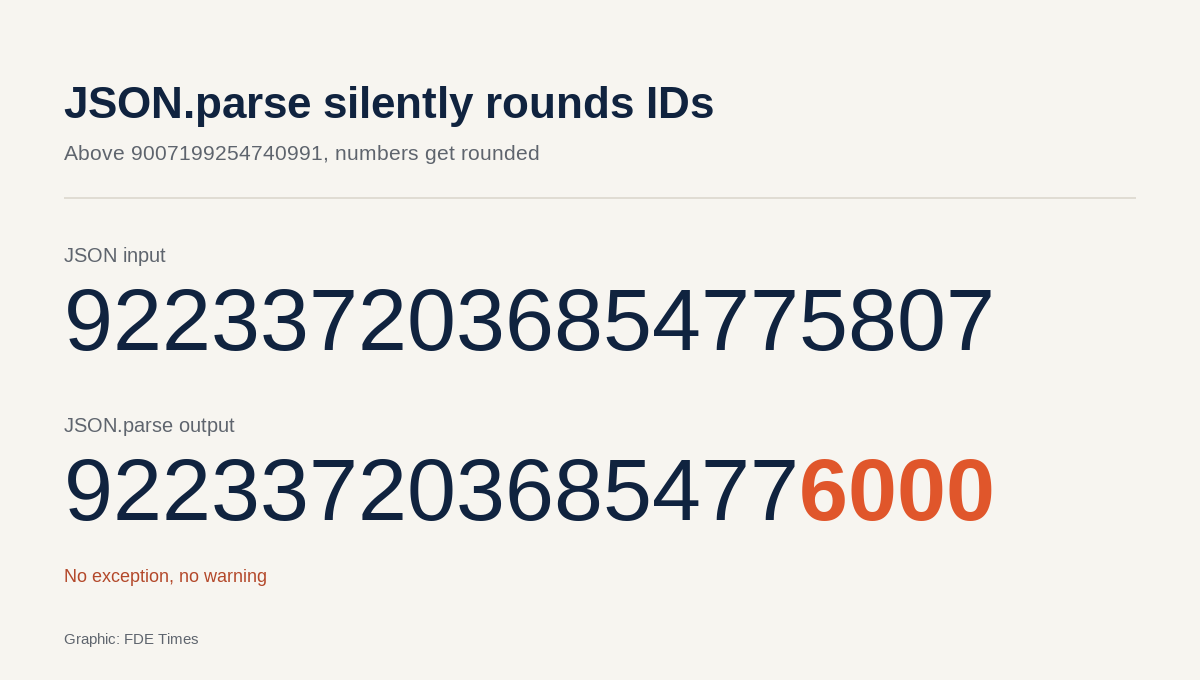
- Above 9007199254740991, a JavaScript Number no longer holds integers exactly: 9223372036854775807 becomes 9223372036854776000.
- X, Discord, ProtoJSON and OpenAPI all recommend sending 64-bit IDs as strings; node-postgres returns int8 as a string by default.
- If you must parse JSON numbers, read context.source in a reviver, and remember that JSON.stringify throws a TypeError on BigInt.
X’s API documentation illustrates this bug with a very short example. Assign id = 10765432100123456789 in JavaScript, print it, and you get 10765432100123458000. No exception, no warning: the last few digits are simply different.
For an FDE this is the worst kind of bug, because it lives exactly where FDEs spend most of their time: the boundary between two systems. The client’s database stores 64-bit IDs, the API returns JSON, and your service is written in JavaScript or TypeScript.
At each stage an ID can quietly become a different ID, and the bug only surfaces when someone looks up an order that does not exist.
The good news is that the bug follows a clear rule. Once you understand it, you can block it in the first week of an integration, before real data flows through.
The number gets rounded, silently
The threshold to remember is Number.MAX_SAFE_INTEGER, or 9007199254740991. MDN points out that beyond it, JavaScript no longer guarantees correct integer comparisons: MAX_SAFE_INTEGER + 1 === MAX_SAFE_INTEGER + 2 evaluates to true, which is mathematically wrong.
A 19-digit ID sits far beyond that 16-digit limit. The README of the json-bigint library has a compact example: the input is 9223372036854775807, but the built-in JSON.parse returns 9223372036854776000. The JSON standard itself warned about this.
RFC 8259 treats only integers in the range -(2^53)+1 to 2^53-1 as safe for interchange between systems, because software built on IEEE 754 doubles will agree on exactly the same value.
Worse than a wrong number is a duplicate one. The TC39 proposal for JSON source text access notes that 999999999999999999 and 1000000000000000000 both parse to the same value. Two different customers now share an ID, and any downstream dedupe or join will merge their data.
The big APIs chose strings
API providers ran into this long ago, and their answers are almost identical. X recommends strings, and for API v1.1 says to always use the id_str field.
Discord always returns Snowflake IDs, up to 64 bits, as strings in its HTTP API to prevent overflow in some languages. ProtoJSON, the mapping from Protocol Buffers to JSON, emits int64 as a string so that no implementation loses precision.
OpenAPI goes the same way: its format registry recommends representing int64 as a JSON string when values exceed roughly 53 bits. At the database layer, everything depends on the driver you use.
node-postgres’s node-pg-types library returns Postgres int8 as a string by default and leaves the conversion to the developer. The mysqljs/mysql driver is the opposite: supportBigNumbers and bigNumberStrings both default to false, and both must be turned on before BIGINT and DECIMAL columns always come back as strings.
An ID is a label. You never add or subtract it, so treat it as a string from end to end.
Fixing a parser that corrupts IDs
Take a hypothetical case. The client’s order API returns {"order_id": 9223372036854775807, "amount": 120} and you cannot change that side. Many developers’ first instinct is to write a reviver:
const text = '{"order_id": 9223372036854775807, "amount": 120}';

// Wrong: the reviver receives value after the number has already been rounded
JSON.parse(text, (key, value) =>
  key === 'order_id' ? String(value) : value
).order_id; // "9223372036854776000"
This rescues nothing. MDN states plainly that the reviver runs after the value has been parsed, so by the time the reviver sees it, the JSON number is already a Number and may have lost precision. What you need is the original text, and that is the job of the third parameter, context:
const order = JSON.parse(text, (key, value, context) =>
  key === 'order_id' ? context.source : value
);
order.order_id; // "9223372036854775807" (a string, every digit intact)

// If you really need arithmetic:
// BigInt(context.source) -> 9223372036854775807n
context.source holds the original JSON text of the value, and is only available for primitive values such as numbers and strings. The feature reached Baseline “Newly Available” on 2025-03-31 (Chrome 114, Edge 114, Firefox 135, Safari 18.4) and is expected to become “Widely Available” on 2027-10-01.
Before relying on it, check the client’s actual runtime. If the environment is older, use a library such as json-bigint, which keeps 9223372036854775807 intact.
String or BigInt? For IDs, choose the string. BigInt has a trap: JSON.stringify throws a TypeError when it meets a BigInt value. If you have already used BigInt, convert it back to a string before sending:
JSON.stringify(payload, (k, v) =>
  typeof v === 'bigint' ? v.toString() : v
);
Where fixes still break
The most common mistake is fixing the parser correctly and then breaking the ID again at a later stage. A single Number(order.order_id) for sorting, or a parseInt call while building a URL, is enough to send the ID back to a double. Search the codebase for every place that casts a field whose name ends in id.
The second mistake is trusting the logs. If the logger parses and re-prints JSON, the logs will show the rounded number too, and you will lose hours comparing them against the database. When investigating, record the raw payload as text before parsing it.
The third is switching to BigInt to be “technically correct” and then letting JSON.stringify throw a TypeError on an endpoint that is rarely called. This time the program does report an error, but it shows up in production, the last place you want to see it.
Check every stage before real data flows
When you take on a new integration, start with the database. List the ID columns and their types; any BIGINT or int8 means values may exceed 53 bits. Then open the driver configuration: node-postgres is safe by default, while mysqljs needs both big number flags turned on.
The next stage is the API contract. If the spec declares an ID as integer with format: int64, check which type the generated TypeScript client uses for that field; if it is number, the ID can already be rounded.
In that case, ask the provider to add a string field such as id_str. If that is not possible, parse with context.source in a single place in the code.
Finally, the tests. Most projects’ fixtures use IDs like 1, 2 and 42, so the bug never shows. Add 9223372036854775807, plus the pair 999999999999999999 and 1000000000000000000 to catch collisions, run them through the whole pipeline, and compare the output IDs with the input as strings.
Predict the result before you run it
To make sure the rule has sunk in, try a small exercise. Write down what you expect the code below to produce, then run it in Node or a browser console:
const text = '{"a": 999999999999999999, "b": 1000000000000000000}';
const obj = JSON.parse(text);
obj.a === obj.b; // prediction: ?

JSON.parse(text, (k, v, ctx) =>
  typeof v === 'number' ? ctx.source : v
); // prediction: ?
If you predicted that the third line gives true and that the last call keeps two distinct strings, you have it right: two different IDs collapse into one once they pass through Number, and only the original text preserves them.
In a real deployment, integration bugs like this rarely appear as a stack trace. They usually arrive as a ticket saying “records are missing” or “two customers’ data got mixed up”.
Being able to walk through such a bug stage by stage, from the 9007199254740991 threshold to the regression test that blocked it, is a persuasive way to show you can do integration work, on a CV or in an interview.
The next time a client reports “this order can’t be found”, look at the last three digits of the ID before you suspect their database.
Was this article useful?
Thanks for the feedback!
13 sources
- Number.MAX_SAFE_INTEGER - JavaScript | MDN · 2026-10-26
- json-bigint README (sidorares/json-bigint)
- JSON.parse() - JavaScript | MDN · 2026-10-26
- tc39/proposal-json-parse-with-source
- RFC 8259: The JavaScript Object Notation (JSON) Data Interchange Format · 2017-12
- JSON source text access | Web platform features explorer
- X IDs - X API documentation
- API Reference - Discord Developer Documentation
- ProtoJSON Format | Protocol Buffers Documentation
- int64 format - OpenAPI Format Registry
- node-pg-types README (brianc/node-pg-types)
- mysqljs/mysql Readme
- BigInt - JavaScript | MDN · 2026-09-02