When client data is scanned invoices, text-only RAG goes blind
A short DeepLearning.AI course built with Weaviate teaches RAG systems to read images, charts and flowcharts, and to turn them into structured data.
In brief
- Building Multimodal Search and RAG is an Intermediate-level DeepLearning.AI short course taught by Sebastian Witalec of Weaviate, running 1h34m according to the official page
- Three ideas worth keeping: modality-independent embeddings, RAG that retrieves and reasons over images, and reading invoices or flowcharts into structured data
- You need basic Python and prior familiarity with RAG; Weaviate Academy's Multimodal Data: In Focus is a natural follow-on
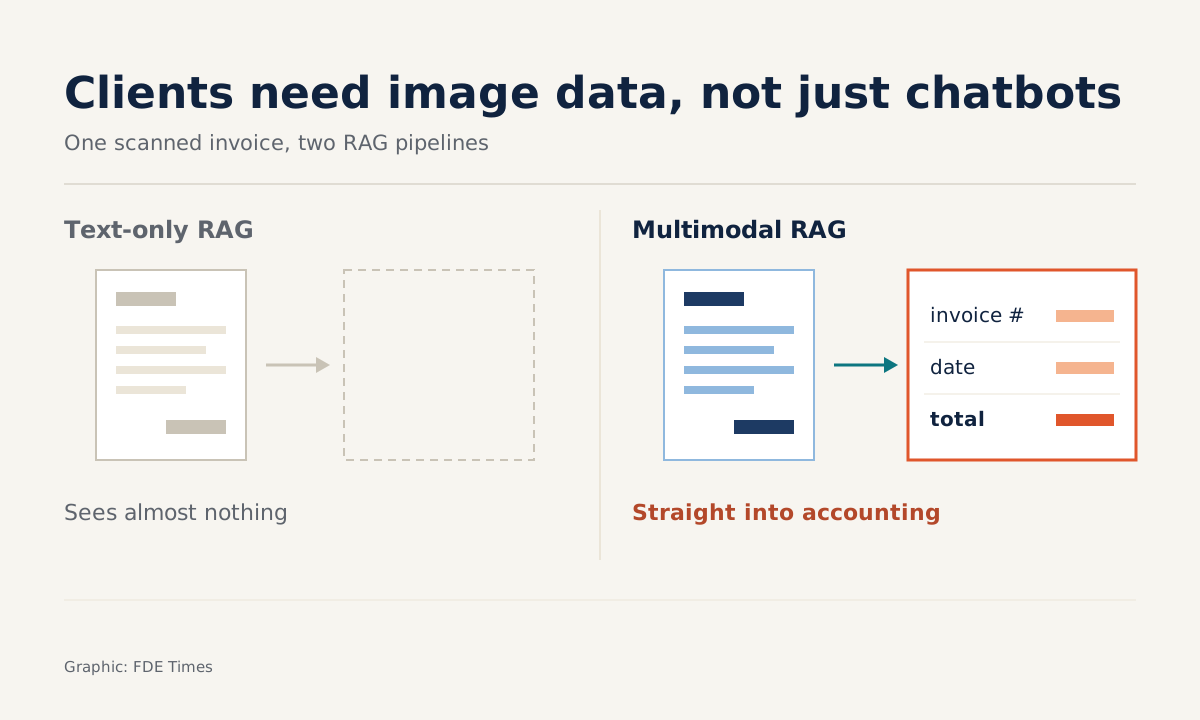
Picture your first week on a client site. They hand you a folder of documents, and most of it is scanned invoices, process flowcharts and photographed charts. The RAG pipeline you brought with you can only extract text. It sees almost nothing on those pages, and the chatbot’s answers go wrong at the retrieval stage.
DeepLearning.AI’s Building Multimodal Search and RAG targets exactly this situation. Real enterprise data is rarely clean or text-only, so an FDE who can do RAG over images will get much further than one who can only run a demo on a few tidy PDFs.
Who teaches it, and how long does it take?
The course is a DeepLearning.AI Short Course, produced with partner Weaviate. The instructor is Sebastian Witalec, Head of Developer Relations at Weaviate. The course page says it was updated on 11 August 2026; it does not give the original release year.
It is pitched at Intermediate level and consists of 8 video lessons, 1 reading and 1 graded quiz, running 1h34m according to the official page (another listing gives 1 hour 22 minutes).
The course is free for a limited time during its beta, a certificate requires the PRO plan, and it underwent maintenance on 25 February 2026, when some sections were temporarily unavailable. Check its status on the course page before you schedule time for it.
The first idea worth keeping: text and images share one space
The course starts from the familiar definition: RAG brings a company’s private data into the prompt context of an LLM. It then extends that definition to multimodal data. The extension rests on contrastive learning, which you implement yourself during the course.
The idea to grasp is that embeddings can be independent of modality. The course calls this any-to-any retrieval: finding images with text, text with images, or images with images.
Consider what that means: once text and images sit in the same vector space, a query such as “supplier X’s March invoice” can in principle lead to a scanned image even if no text has been extracted from it.
So the first thing to do at a client is to count what share of the document store is images or scans. If that share is large, text-only RAG will hit a quality ceiling very early, however much you tune the chunking.
The second idea: retrieving the right image is only half the job
Finding the right image solves only half the problem. The course teaches you to build a multimodal RAG system that retrieves context including images, then has the model reason over that context so the answer is more precise. In other words, the model has to read the chart, not just return a link to the image file.
On a client site, this difference shows up the moment you demo. Business users do not want five images back. They want an answer, with the image attached as evidence they can check for themselves.
The third idea: from invoice images to structured data
The course’s section on industry applications explicitly covers visually analysing invoices and flowcharts to extract structured data. For an FDE, this is often the most valuable part. A table of invoice numbers, dates and totals pulled from scans can go straight into an accounting system; a chat answer cannot.
Imagine you have 200 scanned invoices. Instead of demoing a chatbot, you return a JSON file for each invoice, then ask the client’s accountant to check 20 of them by hand. Whether those figures match will persuade the client more than any slide.
The most common mistake at this stage is bringing a chatbot when the client needs JSON flowing into their systems. The second is showing results on a few clean invoices without a hand-checked sample. Before building anything, ask the client where the extracted data will go, then agree the list of fields to capture.
What order should you learn in?
DeepLearning.AI recommends basic Python and prior familiarity with RAG. The second requirement deserves attention: if you have never built a text-only RAG pipeline yourself, do that first, because the course treats it as assumed knowledge.
Afterwards, you can move on to Weaviate Academy’s Multimodal Data: In Focus. It is a separate course, not part of DeepLearning.AI.
It teaches you to choose embedding and generative models suited to Weaviate, then to create a collection, import data, let Weaviate generate the vectors, index and search, and it closes with a RAG module.
The DeepLearning.AI course helps you understand the mechanics; the Weaviate course gives you hands-on work with a real vector database.
On a CV, a completion certificate says little. A line such as “built multimodal RAG that retrieves scanned invoices and extracts structured data, validated by hand against a sample” carries far more weight.
When interviewing for an FDE role that mentions document understanding, unstructured data or multimodal, ask directly: how much of the client’s data is scanned images, and do they need answers or structured data? The reply tells you which skills you will use from week one.
An hour and a half of study will not make you a computer vision expert. But the next time a client hands you a folder full of scans, you will not have to say “the system can’t read this part yet”.
Was this article useful?
Thanks for the feedback!