Figma builds its first FDE team, and the job is teaching agents a customer's design system
Figma says plainly that the role is neither sales nor services. The core work is sitting with customers and building the context that lets agents generate code with the right components.

In brief
- Figma is building its first FDE team, hiring at senior/staff level, placed in Product and Engineering and kept entirely separate from sales and services.
- The core work is making enterprise design systems agent-ready, so that AI tools generate code that fits the customer's own system.
- To target this kind of role, practise building agent context on a real codebase and measure the result in numbers.
In its FDE job posting on Greenhouse, Figma is blunt: this is a senior/staff engineering position in Product and Engineering, and it is not sales or services. Figma also says this is the company’s first FDE team, a founding team.
A design-tool company building a team of engineers who sit with customers may sound odd. The reason lies in the mission the posting sets out: make enterprise design systems agent-ready, so that AI tools generate code that fits the system and stays true to the design.
That sentence is worth reading slowly. It shows where FDE work in AI is heading: what customers need is no longer just an API integration but a layer of context built specifically for their organisation. Only someone who understands both the code and the people on the customer’s side can build that layer.
The product exists, so what is missing?
Look at Figma’s current toolset and the infrastructure is fairly complete. According to its developer documentation, the Figma MCP server brings Figma into AI workflows. The server does more than read design data: from an MCP client, agents can also create and edit content directly in Figma.
Next comes Code Connect, the bridge between a codebase and Dev Mode. According to Figma, it keeps generated code consistent with the customer’s codebase by reusing their real components. The documentation also says agents can use the design system as the source of truth when building and editing content in Figma.
Config 2026, held in June, pushed the company a step further towards code. Code Layers puts code on the canvas, and in Figma’s description designers can now create interactive code directly in Figma. The Skills feature, according to a summary by Classmethod, lets teams package their own design workflows and conventions as reusable instructions for agents.
But all these tools share one weakness: they are only containers. Code Connect does not know on its own which Button component in a customer’s repo corresponds to which component on the canvas.
Skills does not know on its own when a bank’s design team uses the warning variant rather than the danger variant. That context lives in the heads of each organisation, and no product can ship it in a box.
What does “agent-ready” look like in practice?
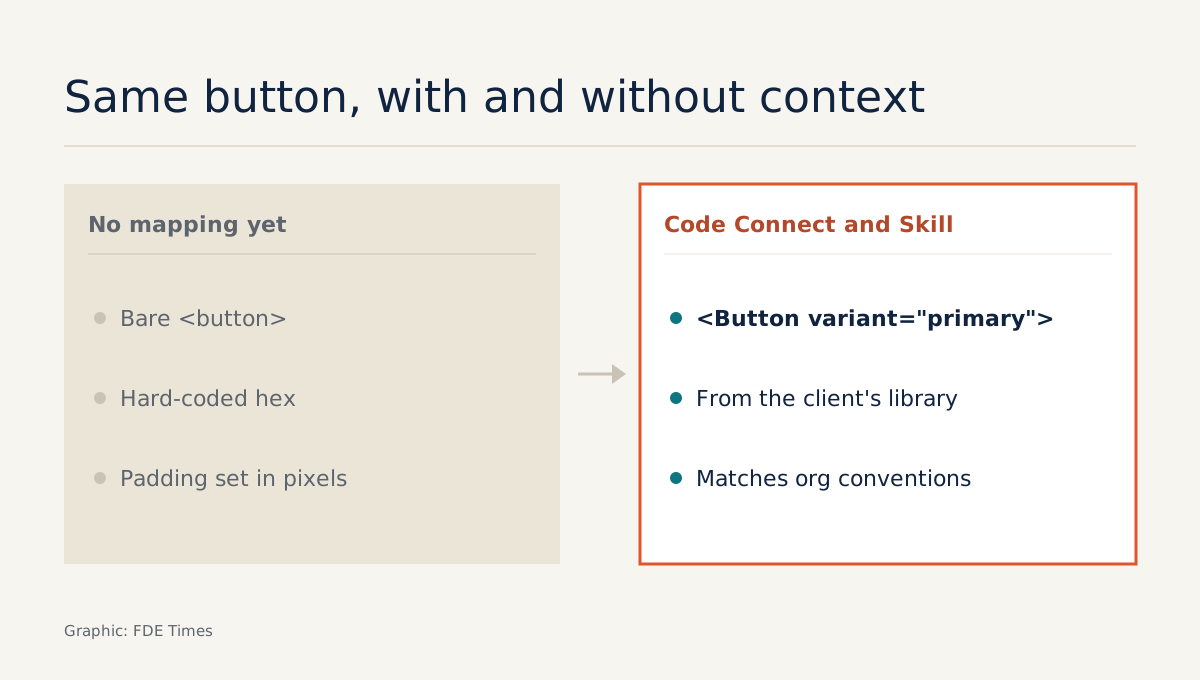
Picture a company with an internal React component library and a Figma file containing a “Button/Primary” component. Without a mapping, the agent reads the design through MCP and generates a bare <button> tag with a hard-coded hex colour and padding in pixels. It looks right, but it uses nothing from the design system.
With a Code Connect mapping in place, the agent knows to import <Button variant="primary"> from the customer’s library. Add a Skill that records a convention such as “forms always place the primary button on the right, never two primary buttons side by side”, and the generated code is not only the right component but also follows the way that organisation actually uses it.
Getting from the first state to the second is the FDE’s job. You have to read the customer’s repo, sit with the design team to draw out conventions they have never written down, write the mappings and instructions, then test the results on real screens.
The table below sets the product documentation alongside the mission in the job posting. The right-hand column is an inference about what each layer of tooling demands on the customer’s side, not a list published by Figma.
| Product layer | What the product provides | What the FDE must do at the customer |
|---|---|---|
| MCP server | Reads design data and writes back to the canvas from an MCP client | Connect it to the AI tools the customer uses, and decide what agents may write and where |
| Code Connect | Bridge between the codebase and Dev Mode | Map each canvas component to the real component in the customer’s repo |
| Skills | A container for reusable agent instructions | Draw out the design team’s unwritten conventions and turn them into instructions |
Every customer gets the same middle column; the right-hand column differs for each one. That non-repeatable part is why a product company has to hire engineers who go on site.
Why does it have to be senior?
The posting’s required qualifications are five or more years building production software end to end, plus a significant stretch working embedded with customers or partner teams. The role also involves regular travel to work in person with strategic customers.
The reason is easy to see from the kind of decisions this person has to make. Map a shared component wrongly and every screen the agent generates is wrong with it.
Give an agent write access to a large company’s canvas without setting boundaries and it can wreck an entire team’s files. Choices like these need someone who has shipped and run real systems themselves.
There is one more reason, in the words “Product and Engineering”. The first team is often where the product learns the most: each time FDEs have to write the same kind of mapping or instruction over and over, it signals to the product team what to automate next.
A services engineer simply gets the job done; a product engineer brings the lesson back.
What should you practise if you are aiming for this role?
The central skill is building context for agents on an existing system, not writing clever prompts.
The best way to practise is to do a small version of exactly this work: take an open-source design system with a React library, map a few components, write convention instructions, then have an agent build the same screen twice, once with context and once without.
Then measure. Count, in each run, how many interface elements use components from the library and how many are bare HTML with hard-coded values.
Do not stop at counting components, because a screen can use the right components and still break the system. Also check whether colours and spacing come from the library’s tokens or are still hex codes and hand-typed pixel values.
Then check variants: a delete-account button that the agent builds with variant="primary" instead of the danger variant is an error that a component count will not catch.
Suppose the first run has only 3 of 20 elements meeting all three criteria and the second has 17 of 20: a number like that on a CV or portfolio is more persuasive than any line about “experience with AI agents”.
When reading an FDE description at any company, you can use Figma’s posting as a yardstick. Which part of the organisation is the role in, at what level, is it a founding team, does it require time embedded with customers? Those lines tell you whether you will be a product engineer in the field or part of a post-sales implementation team.
The mappings and instructions the first team writes by hand today will likely be built into the product over time. Whoever joins now will be the one choosing what is worth automating, and that is a position worth aiming for.
Was this article useful?
Thanks for the feedback!
6 sources
- Forward Deployed Engineer – Figma (Greenhouse)
- Figma MCP server – Figma Developer Docs
- Code Connect – Figma Developer Docs
- Everything announced at Config 2026 – Figma Forum · 2026-06-24
- Figma Launches Code Layers, Motion at Config 2026 – CMSWire · 2026-06-24
- Summary of Figma's New Features Announced at Config 2026 – Classmethod · 2026-06-25